openHASP
A comprehensive firmware for ESP32 and STM32F4 microcontrollers that provides a customizable touchscreen UI controlled via MQTT. It utilizes the LVGL graphics library to drive various commodity displays, enabling home automation control through a flexible JSONL-based configuration.
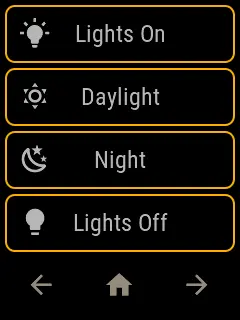
openHASP is a powerful, open-source firmware designed to transform commodity touchscreen displays into versatile home automation controllers. Originally inspired by the HASwitchPlate project, openHASP represents a significant evolution by removing the requirement for proprietary Nextion hardware. Instead, it leverages the Light and Versatile Graphics Library (LVGL) to drive a wide array of affordable LCD and OLED displays directly from the MCU.
Core Capabilities and Architecture
The project is built to run on high-performance microcontrollers like the ESP32 and STM32F4, taking advantage of their hardware capabilities to deliver a smooth, responsive user interface. By using MQTT as its primary communication protocol, openHASP integrates seamlessly with popular home automation platforms such as Home Assistant, OpenHAB, and Node-RED.
One of the standout features of openHASP is its configuration-driven approach. Users can define their UI layout using pages.jsonl files, which utilize a simple JSON Lines format to describe buttons, sliders, labels, and other widgets. This allows for rapid prototyping and easy updates without needing to recompile the firmware for every UI change.
Hardware and Display Support
openHASP supports a vast ecosystem of hardware, including:
- Microcontrollers: ESP32, ESP32-S3, ESP32-C3, and STM32F4xx series.
- Display Drivers: Integration with popular drivers like TFT_eSPI, LovyanGFX, and Arduino_GFX.
- Touch Controllers: Support for various capacitive and resistive touch chips, including Goodix, FT6336, TSC2007, and GSL1680.
- Ready-to-use Boards: Pre-configured setups for devices like the Lanbon L8, M5Stack Core2, Lilygo TTGO, and various Sunton or Elecrow displays.
Feature-Rich User Interface
Beyond simple buttons, openHASP provides a rich set of UI components and features:
- Advanced Objects: Support for QR codes, canvases, drop-down lists, tab views, and animated spinners.
- Theming and Customization: A built-in HASP theme that adapts to different screen sizes, with support for custom TrueType fonts and Material Design icons.
- Dynamic Content: The ability to update object properties (like text, color, or value) in real-time via MQTT commands.
- Media Support: Displaying images (PNG, BMP, GIF) from local storage or via URL, provided the hardware has sufficient PSram.
Connectivity and Management
The firmware includes a robust web interface for device management. From the browser, users can configure Wi-Fi and MQTT settings, manage GPIO pins, and use a built-in file editor to modify configuration scripts or UI definitions. It also supports over-the-air (OTA) updates, Telnet for remote logging, and even a simple FTP server for easy file transfers to the device’s internal storage (SPIFFS or LittleFS).
For Home Assistant users, openHASP offers a custom component that facilitates automatic discovery, making it trivial to link the physical touchscreen to virtual entities in the automation dashboard. Whether you are building a simple light switch or a complex multi-page media controller, openHASP provides the tools to create a professional-grade interface on low-cost embedded hardware.