RisalDash
RisalDash is a C++ library for ESP32 and ESP8266 that automatically generates real-time web dashboards with zero front-end coding. It features a zero-waste architecture to minimize flash usage, built-in captive portal provisioning, and native integration with Home Assistant and AI agents via the Model Context Protocol (MCP).
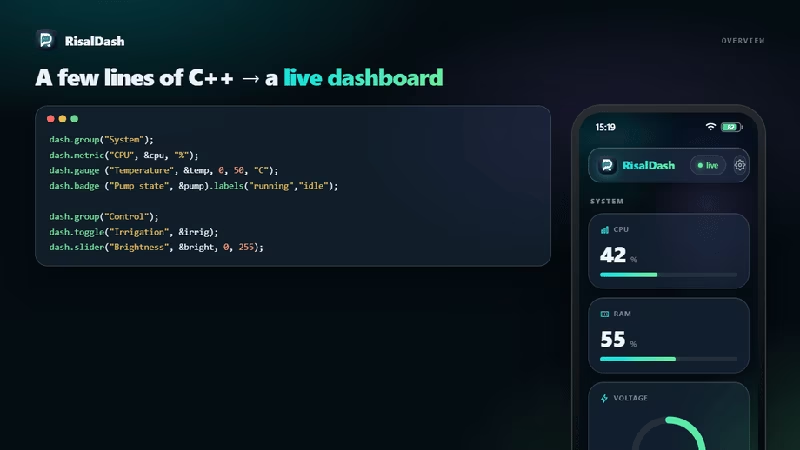
Real-Time Dashboards Without the Front-End Overhead
Developing a web-based user interface for embedded systems like the ESP32 or ESP8266 typically involves a significant amount of boilerplate code. Developers often find themselves hand-writing HTML, CSS, and JavaScript, then manually implementing a WebSocket or REST protocol to sync variables between the hardware and the browser. RisalDash changes this paradigm by allowing developers to describe their UI entirely in C++, which the library then uses to generate the front-end assets and communication logic automatically.
Served directly from the device’s flash memory, the resulting dashboard follows a modern “liquid glass” design system using OKLCH colors. It includes features usually reserved for native mobile apps, such as translucent cards, an iOS-like status bar, and multi-page layouts navigated via swipe-up gestures.
Zero-Waste Technical Architecture
One of the most impressive technical aspects of RisalDash is its “Zero-Waste” philosophy. In embedded systems where flash memory and RAM are at a premium, including a full-featured UI library can be daunting. RisalDash utilizes linker-level optimizations (--gc-sections) to ensure that only the code, CSS, and JavaScript for the specific widgets used in your sketch are compiled into the final binary.
If you don’t use a gauge or a chart, that code adds zero bytes to your flash footprint. When you do use a widget, it adds a small, optimized overhead (typically between 1.3 KB and 3.5 KB) that includes all necessary logic for both the C++ backend and the web frontend. This makes the library suitable even for smaller ESP8266 modules with limited resources.
Seamless Connectivity and Provisioning
RisalDash is designed for an “offline-first” experience. It handles the often-complex task of Wi-Fi provisioning through a built-in captive portal. On the first boot, the device creates its own access point; once a user connects, they are presented with a setup page to select a local network and enter credentials. These settings are saved to Non-Volatile Storage (NVS), allowing the device to connect automatically on subsequent reboots.
Beyond basic connectivity, the library integrates deeply with the modern IoT ecosystem:
- Home Assistant: It can automatically publish MQTT discovery configurations, allowing sensors and controls to appear in Home Assistant without manual YAML configuration.
- Prometheus: It exposes a
/metricsendpoint for professional-grade monitoring and observability. - OTA Updates: Built-in support for firmware updates over the air via a web interface.
AI-Driven Control with MCP
A standout feature is the integration with the Model Context Protocol (MCP). By enabling MCP, every widget defined in the C++ code—whether a sensor reading or a toggle switch—becomes a “tool” that an AI agent (like Claude) can interact with. This allows users to control their hardware or query sensor data using natural language through a bridge to an AI desktop client.
Rapid Prototyping with RisalFake
To speed up development, the project includes RisalFake.h, a utility that generates realistic, drifting sensor data. This allows developers to iterate on their dashboard layout and logic without having physical sensors connected. The fake data simulates real-world noise and trends, ensuring the UI feels alive during the prototyping phase. Once the hardware is ready, the developer simply swaps the fake read calls for real sensor driver functions.
Example Implementation
The simplicity of the library is best demonstrated by how few lines of code are required to create a functional, interactive interface:
#include <RisalUI.h>
RisalUI dash("Smart Garden");

float temp = 25.5;
bool pump = false;

void setup() {
  // Define widgets and bind them to variables
  dash.chart("Temperature", &temp, "C");
  dash.toggle("Water Pump", &pump, [](bool on){
    digitalWrite(PUMP_PIN, on);
  });

  // Start the dashboard and captive portal
  dash.begin();
}

void loop() {
  temp = analogRead(TEMP_PIN); // Update the variable
  dash.update();               // Pushes changes to the browser via WebSocket
}
By handling the complexities of state synchronization and UI rendering, RisalDash allows embedded developers to focus on their core application logic while still providing a professional, responsive user experience.
Related Projects
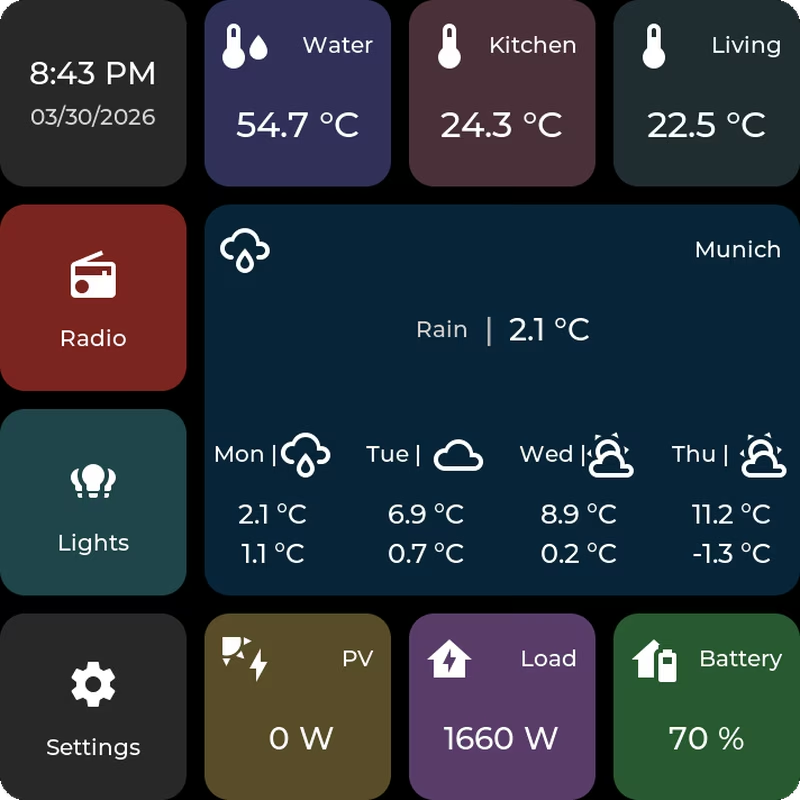
ESP32-P4 Home Assistant Display
A tile-based firmware for ESP32-P4 devices that creates a touch-first Home Assistant dashboard. It utilizes FreeRTOS and LVGL for the user interface, supporting MQTT integration and web-based configuration. The system targets ESP32-P4 hardware like the Waveshare B4 and M5Stack Tab5, featuring OTA updates and internal storage management via LittleFS.
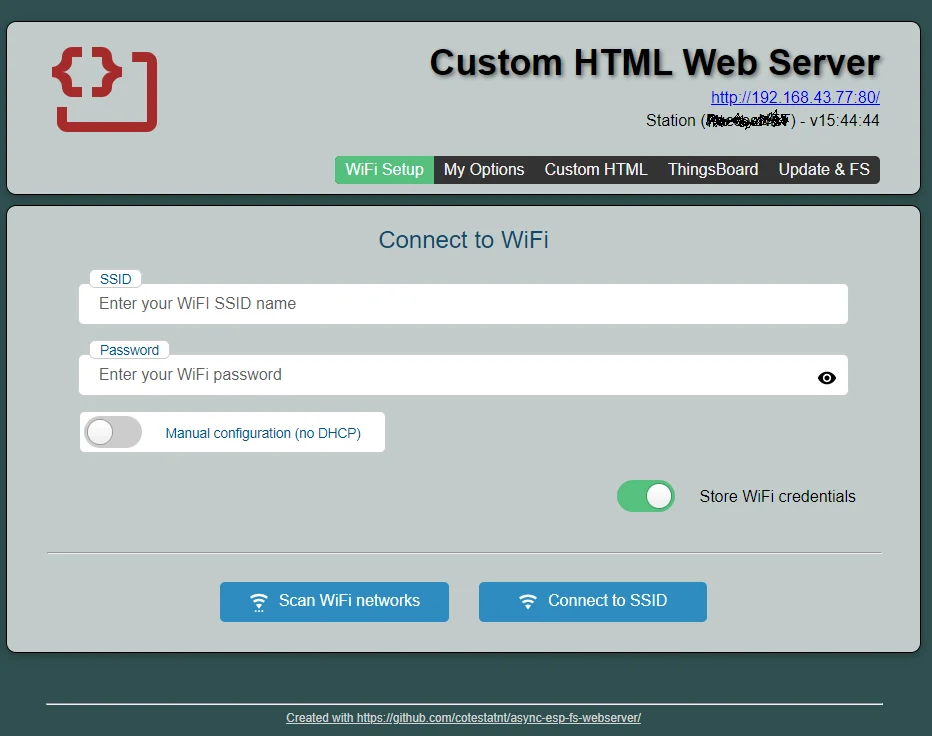
esp-fs-webserver
A comprehensive Arduino library for ESP32 and ESP8266 that simplifies the implementation of web servers with integrated file management, WiFi configuration, and OTA updates. It enables hosting web assets directly from flash memory and includes a built-in code editor for runtime UI adjustments.

ESPUI
A simple Arduino-style library for creating web-based user interfaces on ESP8266 and ESP32 microcontrollers. It leverages WebSockets for real-time control and supports a wide range of UI elements including sliders, switches, and graphs.