OpenSpool
OpenSpool is an open-source filament management system that uses NFC tags to automatically sync spool settings with 3D printers. Built on the ESPHome framework for ESP32 microcontrollers, it integrates with printers via MQTT to automate filament identification and configuration.
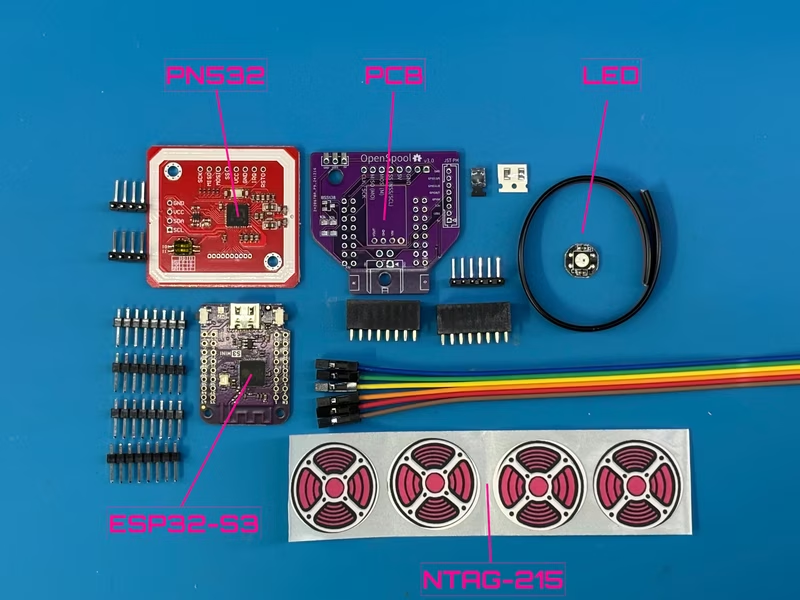
OpenSpool is designed to bring the convenience of automatic filament identification to any 3D printer, mimicking the seamless experience of the Bambu Lab AMS system. By adhering NFC stickers to filament spools and using an ESP32-based reader, users can automatically update printer settings simply by touching the spool to the device.
Protocol and Standards
The project utilizes the OpenSpool protocol, which focuses on simplicity using NTAG 215/216 tags. It stores metadata such as filament type, color (hex), brand, and temperature ranges in a standard NDEF record as a JSON payload. While OpenSpool is the primary protocol, the project is actively working on supporting other standards like OpenTag3D, TigerTag, and proprietary formats from manufacturers like Bambu and Creality.
Printer Integrations
Currently, OpenSpool offers robust support for Bambu Lab printers via MQTT. For newer Bambu firmware (1.08.05.00+), the system requires enabling LAN Mode and Developer Mode. Once configured, the reader communicates directly with the printer to sync filament profiles. Support for other platforms like OctoPrint, Prusa Connect, and Klipper is currently in development or planned.
Hardware and Components
The system is built around the Wemos D1 Mini (S2 or S3) and the PN532 NFC module. While the S3 is recommended for its better memory management, the S2 remains pin-compatible. The design includes a custom PCB to simplify assembly, incorporating a BSS138 MOSFET and 10k resistors for logic level shifting and control.
Assembly and Wiring
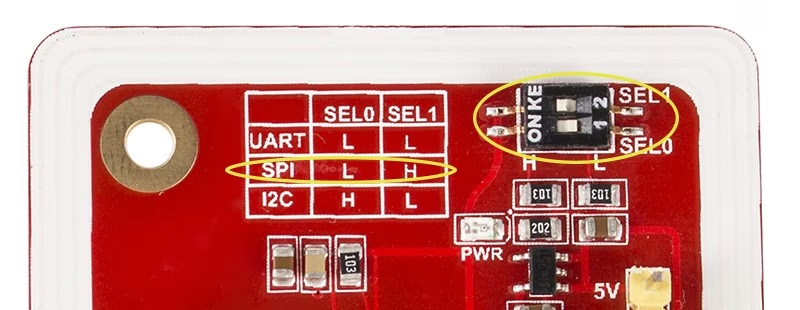
Assembly can be completed using a custom PCB or a breadboard. For the custom PCB version, components like the MOSFET and headers are soldered to a compact board, and the PN532 is configured for SPI mode via physical toggle switches.
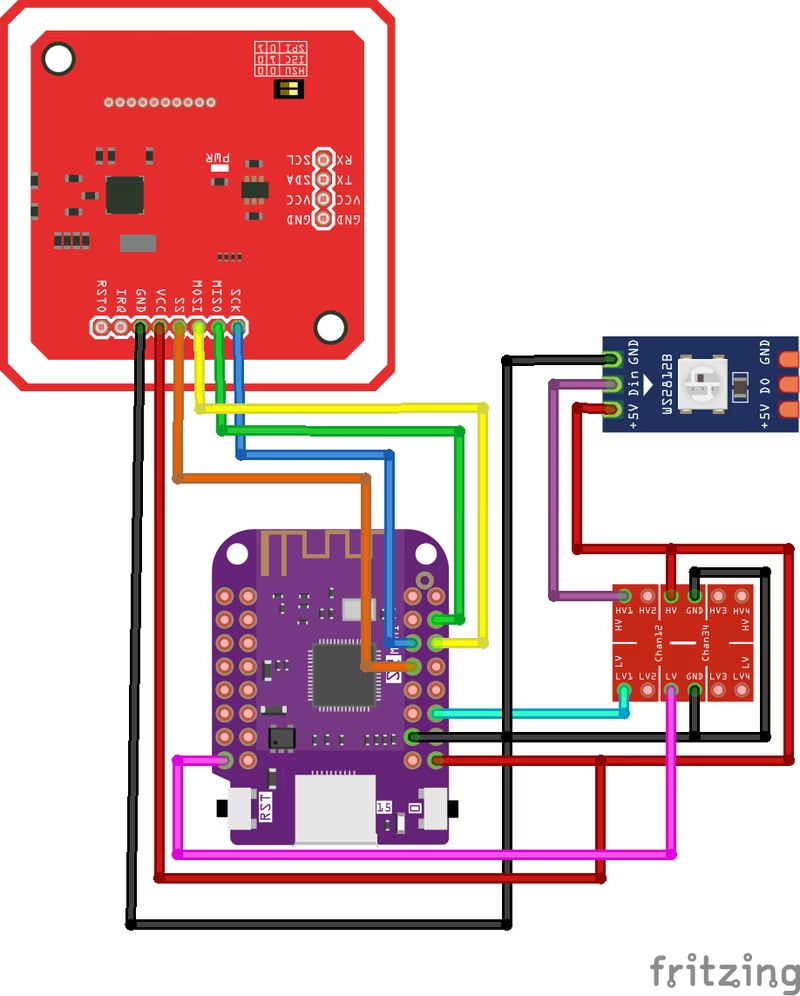
For those assembling the device without the custom PCB, a logic level converter is required to bridge the 3.3v and 5v components. A wiring diagram guides the manual connection of the Wemos D1, PN532, and status LEDs to ensure proper communication between the 3.3v microcontroller and 5v peripherals.
Firmware and Setup
The firmware is powered by ESPHome, which facilitates easy updates and configuration. Users can install the firmware through a web-based tool or via command-line tools using make. The project provides specific build targets for both Lolin S2 and S3 mini modules, managing the full lifecycle from compilation to monitoring.
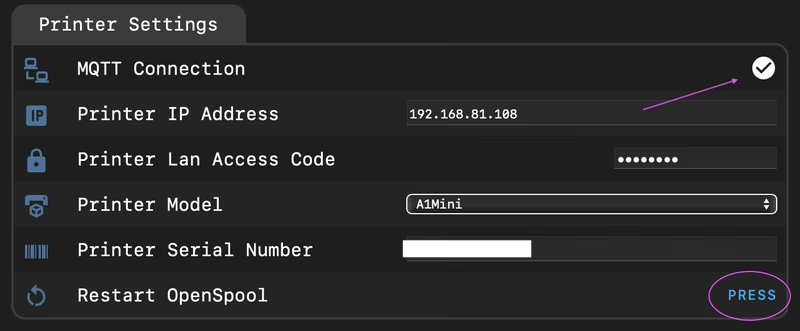
Upon first boot, the device creates a “OpenSpool” Wi-Fi access point for initial credential entry. Once connected to the local network, users configure the 3D printer’s IP address, serial number, and access code through a web interface.
Operational Feedback and Troubleshooting
The device uses a WS2812B LED to provide status updates. A breathing blue light indicates the device is in access point mode, while a solid white light signifies a successful Wi-Fi connection and readiness to scan. Reliability depends on the specific PN532 model used, with different antenna designs requiring specific tag placement for optimal reading. For advanced users, the system allows monitoring MQTT messages to verify that the ESP32 and printer are communicating correctly.