M5Stack Tab5 Game & Watch Emulator
A game selection menu and emulator frontend for running single-screen Game & Watch ROMs on the M5Stack Tab5. It features support for touch controls, USB gamepads, and automatic screen orientation via the built-in IMU.
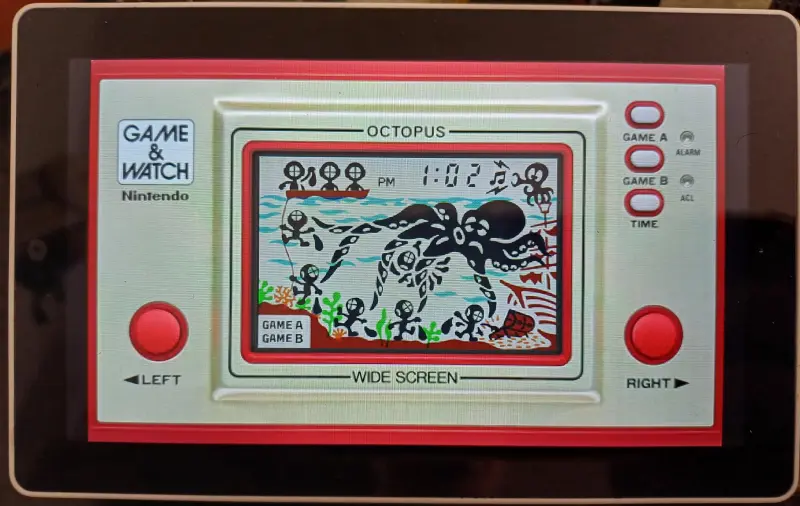
Overview
The M5Stack Tab5 Game & Watch project is a specialized emulator frontend designed to bring classic handheld gaming to the M5Stack Tab5. Powered by the ESP32-P4 SoC, this project provides a polished menu system for selecting and running single-screen Game & Watch ROMs. It leverages the LCD Game Emulator engine to recreate the experience of vintage liquid crystal display games on modern hardware.
Key Features
This project transforms the M5Stack Tab5 into a dedicated retro gaming device with several high-level features:
- Integrated Game Menu: An overlayed menu allows users to navigate between over 30 supported single-screen titles.
- Hardware Integration: Utilizes the Tab5’s built-in IMU for automatic landscape screen orientation at boot.
- Flexible Controls: Supports the built-in touchscreen for virtual buttons, as well as external USB SNES gamepads and USB keyboards.
- Persistence: Saves volume levels, brightness settings, and the last played game to RTC memory, ensuring settings survive a reboot.
- Asset Management: Supports loading ROMs and artworks from either an SD card or the internal LittleFS partition, with support for gzipped assets to save space.
Technical Implementation
The project is built using the Arduino framework on the ESP32-P4 platform. It relies heavily on the M5Unified and M5GFX libraries for display and hardware abstraction. Because the ESP32-P4 runs at a high clock speed (400MHz), it provides ample performance for emulation, though the project specifically optimizes the display refresh rate to maintain a smooth experience.
One of the critical technical aspects of this project is the handling of ROMs and artworks. Original MAME Game & Watch ROMs often include high-resolution SVG or PNG artworks that are too resource-intensive for embedded displays. To solve this, the project uses “shrunk” ROMs generated by the LCD-Game-Shrinker tool. These ROMs, combined with optimized JPEG console graphics, allow the emulator to run efficiently while maintaining the visual charm of the original hardware.
Hardware and Compatibility
The project is specifically tailored for the M5Stack Tab5. It includes specific fixes for USB host support on this hardware, enabling the use of standard USB HID peripherals like gamepads (specifically the 0810:e501 SNES clone) and keyboards.
Supported Games
The emulator supports a wide variety of classic titles, including:
- Ball, Chef, and Fire
- Donkey Kong Jr. (Standard and Panorama versions)
- Mario’s Cement Factory and Mario the Juggler
- Mickey Mouse, Popeye, and Snoopy Tennis
- Octopus, Parachute, and Turtle Bridge
Getting Started
To build the project, developers need the Arduino IDE or PlatformIO environment. Several specific libraries are required, including M5Unified, M5GFX, EspUsbHost, and ESP32-targz.
ROMs should be placed in a /roms folder and artworks in an /artworks folder on an SD card. If using LittleFS, these files should be placed at the root of the filesystem. Users must ensure that the ROM filenames (e.g., gnw_parachute.gw) match their corresponding artwork filenames (e.g., gnw_parachute.jpg) for the menu system to correctly associate the game with its visual representation.