Home Assistant ePaper Remote
A dedicated e-Ink remote control for Home Assistant built for ESP32-S3 devices like the M5Paper and Lilygo T5. It utilizes the Home Assistant WebSocket API for real-time state updates and control without requiring additional server-side plugins.
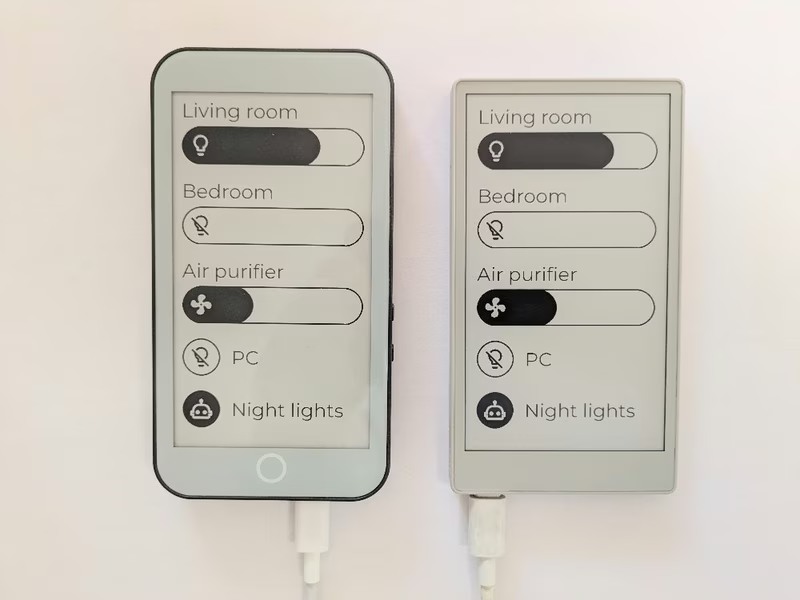
The Home Assistant ePaper Remote provides a tactile, dedicated physical interface for smart home control. Built specifically for ESP32-S3 based e-Ink development boards, this project transforms high-resolution electronic paper displays into interactive control hubs. By utilizing e-Ink technology, the remote offers exceptional readability and a clean aesthetic that blends into home environments more naturally than traditional tablet or smartphone screens.
Hardware and Performance
The project currently supports two primary hardware platforms: the Lilygo T5 E-Paper S3 Pro and the M5Stack M5Paper S3. Both devices feature the powerful ESP32-S3 microcontroller, providing ample processing power for display rendering and wireless communication.
One technical trade-off noted in the project is battery life. Unlike traditional e-Ink devices that sleep deeply between updates, this remote stays permanently connected to Wi-Fi to maintain a WebSocket connection with Home Assistant. This allows for near-instantaneous updates when a device state changes elsewhere in the house, though it limits battery operation to a few hours. It is ideally suited for use in a charging dock or as a semi-portable controller that returns to a power source.
Integration with Home Assistant
Communication is handled through the Home Assistant WebSocket API. This approach is particularly advantageous because it requires no custom components or plugins on the Home Assistant server side. Users only need to generate a Long-Lived Access Token within their Home Assistant security settings to grant the remote access. Once configured, the remote can toggle lights, trigger scenes, and display real-time status updates for various entities.
Customization and Assets
The project is designed to be highly customizable, allowing users to define their own button layouts and iconography. It includes a Python-based asset pipeline for managing visual elements:
- Icon Generation: Users can download PNG icons from the Material Design Icons library. A provided
generate-icons.pyscript, utilizing the Pillow library, converts these images into a C++ header file (icons.h) compatible with the display driver. - Typography: The interface uses the Montserrat font. The repository includes instructions for converting standard TrueType fonts into the FastEPD format using specific font conversion tools, ensuring that the text remains crisp on the e-paper surface.
- Configuration: Hardware-specific settings and Home Assistant credentials are managed through a
config_remote.cppfile, making it easy to swap between different devices or server environments.
Technical Stack
The firmware is developed using the Arduino framework within the PlatformIO ecosystem. It relies on the FastEPD library for efficient display rendering and the bb_captouch library for handling capacitive touch input on supported screens. Because it targets the ESP32-S3 and uses the standard ESP-IDF/Arduino build path, it operates on top of FreeRTOS, managing networking tasks and UI rendering concurrently.