ESP32 Graphical Bootloader
A 3rd stage graphical bootloader for ESP32-S3 and ESP32-P4 devices that allows users to select applications from OTA partitions via a visual menu. Built with ESP-IDF and LVGL, it manages multiple firmware images and provides a mechanism for applications to return to the bootloader upon restart.
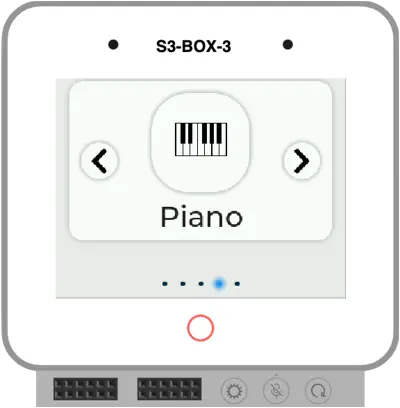
Overview
The ESP32 Graphical Bootloader is a specialized 3rd stage bootloader designed to enhance the user experience on ESP32-based development kits with integrated displays. It provides a visual interface that allows users to choose between multiple applications stored in different Over-the-Air (OTA) partitions. This is particularly useful for multi-purpose devices like the ESP32-S3-BOX-3 or M5Stack-CoreS3, where a user might want to switch between different utilities, games, or demos without reflashing the device.
How It Works
The bootloader operates by leveraging the standard ESP-IDF OTA mechanism. Upon startup, the device boots into the “factory” partition where the graphical bootloader resides. The user interacts with a menu to select a specific application. Once a selection is made, the bootloader updates the OTA data partition to point to the chosen application’s partition and triggers a system reboot.
To ensure the device returns to the graphical menu after the selected application is finished or the device is restarted, a small code snippet must be included in the guest applications. This snippet resets the boot partition back to the factory partition (the bootloader) before the application fully initializes or upon a specific user action like pressing a back button.
Technical Implementation
The project is built using the ESP-IDF framework and utilizes LVGL (Light and Versatile Graphics Library) to render the user interface. It supports high-resolution displays and modern ESP32 variants including the ESP32-S3 and the newer ESP32-P4.
The memory layout is defined in a custom partitions.csv, which allocates space for the factory bootloader and five distinct OTA partitions (ota_0 through ota_4). Each partition is sized to accommodate substantial applications (approximately 2.8MB each in the default configuration).
Hardware Support
The project includes pre-configured build profiles for several popular ESP32 development boards:
- ESP32-S3-BOX-3 and the original ESP32-S3-BOX
- M5Stack-CoreS3
- ESP32-P4 Function EV Board
Integration and Customization
For an application to work seamlessly with this bootloader, it needs to include a fallback mechanism. This is achieved by using the esp_ota_ops.h component to set the boot partition back to factory.
#include "esp_ota_ops.h"

// Get the partition structure for the factory partition
const esp_partition_t *factory_partition = esp_partition_find_first(ESP_PARTITION_TYPE_APP, ESP_PARTITION_SUBTYPE_APP_FACTORY, NULL);
if (factory_partition != NULL) {
    if (esp_ota_set_boot_partition(factory_partition) == ESP_OK) {
        printf("Set boot partition to factory.\n");
    } else {
        printf("Failed to set boot partition to factory.\n");
    }
}

printf("Restarting now.\n");
esp_restart();
Build and Deployment
The project provides a comprehensive Bootloader.cmake script to automate the process of building the main bootloader and all sub-applications simultaneously. It also includes commands for using esptool.py to merge all resulting binaries—the bootloader, partition table, and multiple app images—into a single 16MB binary for easy flashing. This streamlined workflow allows developers to manage complex multi-app environments with a single command.