ComfoSense Touch: Zehnder ComfoAir Q350 MQTT Bridge & Controller
An ESP32-S3 based touch screen controller and MQTT bridge for Zehnder ComfoAir Q350 ventilation units. It replaces the ComfoSense hardware, providing a modern UI via LVGL and integrating with Home Assistant via CAN bus and MQTT.
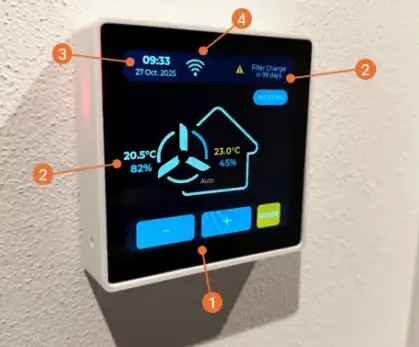
Overview
ComfoSense Touch is an open-source firmware project designed to replace the proprietary Zehnder ComfoSense controller and ComfoConnect LAN C bridge. Built for the ESP32-S3, it provides a high-performance touch interface and a robust MQTT bridge for Zehnder ComfoAir Q350 ventilation systems. By leveraging the ESP32’s integrated CAN controller (TWAI) and the LVGL graphics library, the project offers a significantly more responsive and feature-rich user experience than the original hardware.
The project solves common issues with the default Zehnder ecosystem, such as limited Wi-Fi range in utility rooms, vague filter change notifications, and lack of granular sensor data. It allows users to bring the control interface into a central living area while maintaining full integration with Home Assistant.
Key Features
- Modern Touch Interface: Utilizes a 4-inch Waveshare ESP32-S3 Touch LCD to provide a snappy, intuitive UI for fan control, boost modes, and temperature profiles.
- Dual Operating Modes: Can function as a direct CAN-connected controller (replacing the physical ComfoSense) or as a Remote Client that communicates solely via MQTT.
- Enhanced Sensor Data: Provides precise countdowns for filter changes and exposes detailed MVHR data including temperature and humidity levels.
- Home Assistant Integration: Acts as an MQTT bridge, allowing full automation and monitoring through Home Assistant’s MQTT integration.
- Smart Boost Logic: Implements a custom boost function with 20-minute increments (up to 99 minutes) that operates independently of the ComfoAir’s internal logic limitations.
- Night Mode & Dimming: Supports scheduled screen shutdown and hardware-based PWM dimming for bedroom installations.
Technical Implementation
The firmware is developed using the Arduino framework within PlatformIO, targeting the ESP32-S3. It relies heavily on the LVGL (Light and Versatile Graphics Library) for its user interface, ensuring smooth animations and a professional look.
Communication with the ventilation unit is handled via the ESP32’s Two-Wire Automotive Interface (TWAI), which is compatible with the CAN bus protocol used by Zehnder’s ComfoNet. The project uses optimized TWAI driver configurations, specifically adjusting queue lengths to ensure CAN frames are processed without delays that could cause the unit to become unresponsive. Time management is handled via NTP, with logic to synchronize the MVHR’s internal clock to ensure consistent scheduling.
Hardware Requirements
The primary target hardware is the Waveshare ESP32-S3 4-inch Touch LCD Dev Board, which includes an embedded CAN transceiver. For users who only require the MQTT bridge functionality without the display, the project is also compatible with the Waveshare ESP32-S3-RS485-CAN module.
For the dimming feature to function, a minor hardware modification is required involving the soldering of two SMD 0402 resistors (a 100k and a 0R) to enable PWM control of the backlight via the I2C expander.
Getting Started
To deploy the firmware, users must configure their environment in PlatformIO. A secrets_template.h file is provided to define Wi-Fi credentials, MQTT broker settings, and timezone information.
// Example configuration in secrets.h
#define WIFI_SSID "YourSSID"
#define MQTT_SERVER "192.168.1.50"
#define REMOTE_CLIENT false // Set to true for MQTT-only mode
Once configured, the project can be flashed using standard PlatformIO commands. The repository also includes 3D-printable files for wall mounting, designed to fit standard Swiss junction boxes, and a decorative frame to provide a clean, finished look for home installation.