Periodic tasks and deadlines
Why a delay in a loop drifts and a sleep until the next period does not, what a deadline is, and how a more urgent task makes a periodic one miss it.
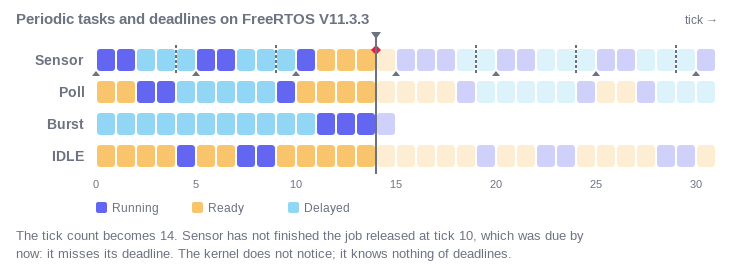
Simulated kernel: FreeRTOS V11.3.3 and Zephyr v4.5.0. This scenario and every other one are in the scheduler playground. The simulator and its data files are not covered by the site's CC BY-SA license; see their license notices.
Much of what an embedded system does is periodic: sample a sensor every 5 ms, run a control loop at 1 kHz, refresh a display 30 times a second. Each run of the work is a job. The time between the starts of two jobs is the period, and the time by which a job must be finished is its deadline, counted from the job’s release.
A periodic task is a loop: do the work, then sleep until the next period. How it sleeps matters more than it looks.
Two ways to sleep
for( ;; ) {                         for( ;; ) {
    do_work();                          do_work();
    vTaskDelay( 5 );                    xTaskDelayUntil( &xLastWakeTime, 5 );
} }- A relative delay (
vTaskDelay, Zephyr’sk_sleep(K_TICKS(5))) sleeps for 5 ticks from now. “Now” is whenever the work happened to finish, so the real period is the delay plus the work plus any time the task spent preempted. It changes from one loop to the next, and the error adds up: the task drifts. - An absolute delay sleeps until a point in time. FreeRTOS’s
xTaskDelayUntil()keeps the last wake-up time inxLastWakeTimeand adds the period to it; Zephyr does the same withk_sleep(K_TIMEOUT_ABS_TICKS(next)), with the application adding the period tonext. The wake-ups stay on a fixed grid, however long the work took.
The scenario
Sensor(urgency 2) works for 2 ticks every 5 ticks, withdelayUntil(5). Its deadline is 4 ticks after each release. The timeline marks each release with a small triangle and each deadline with a dashed line.Poll(urgency 1) does the same work, but sleeps withdelay(5).Burst(urgency 3) arrives at tick 11 and computes for 4 ticks: an event that is more urgent than the sensor, such as a burst of network traffic.
What happens
-
Tick 0:
Burstdelays itself,Sensorreads the tick count (0) as the start of its first period and works. At tick 2 it sleeps until tick 5.Pollworks next and at tick 4 delays for 5 ticks. -
Sensorwakes exactly at 5 and at 10, the start of each period. Its first two jobs take 2 ticks each and finish at ticks 2 and 7, well before their deadlines at 4 and 9. -
Pollhad asked for 5 ticks of sleep, but its starts are not 5 apart: it waits behindSensorwhenever they are ready together, and it measures each delay from wherever its work ended. Over the run its starts drift further from any fixed grid. On Zephyr eachk_sleepis also one tick longer (the tick lesson explains why), so it drifts faster. -
Tick 11 (tick 12 on Zephyr, where
Burst’s own start delay is one tick longer):Burstwakes and preemptsSensorin the middle of its third job. (On Zephyr,Burstarrives just as the job’s two ticks of work are done, beforeSensorreachesk_sleep(), so the job still counts as unfinished.) -
Tick 14:
Sensor’s third job, released at 10, is not done. It has missed its deadline. The kernel does not notice: neither FreeRTOS nor Zephyr knows about deadlines. The simulator marks the miss in red, because a real system would have to notice it itself, for example with a watchdog or by comparing the time at the end of each job. -
Burstends andSensorfinishes the late job. Its next period started at 15, so it is already late for that one too. Here the kernels differ:- FreeRTOS:
xTaskDelayUntil()finds that the wake-up time has passed and does not sleep at all. The next job starts at once, back to back with the late one. - Zephyr: an absolute timeout in the past fires on the next tick, so
Sensorsleeps for one tick before its next job.
On both, the grid is kept: the following wake-ups are at 20, 25 and 30 again.
- FreeRTOS:
A missed deadline is not always a failure. Missing an occasional display refresh is harmless; missing the moment to fire a car’s airbag is not. Systems are hard or soft real-time depending on which kind of deadline they have.
Why the sensor missed
Sensor needs 2 ticks every 5. Burst needed 4 ticks at once, and it was more urgent, so Sensor
could not get its 2 ticks inside its 4-tick window. Whether a set of tasks always meets its
deadlines depends on their periods, their work and their priorities; checking that before the
system runs is called schedulability analysis, and it starts from exactly these numbers.
What to try
- Set Sensor urgency to 4, above
Burst. NowSensorpreemptsBurstand every job is on time;Burstfinishes a little later instead. Giving shorter-period tasks higher priority is the idea behind rate-monotonic scheduling. - Set Burst starts at tick to 16.
Burstnow lands on the fourth job, which misses its deadline at tick 19. - Set Sensor deadline (ticks) to 5, the whole period. The third job still misses, at tick 15: it only finishes at 16.