ZEReader
A Zephyr RTOS-based firmware for an open-source hardware eBook reader targeting the Raspberry Pi Pico (RP2040/RP2350). It supports ePaper displays and SD card storage to provide a portable, low-power reading experience for EPUB files.
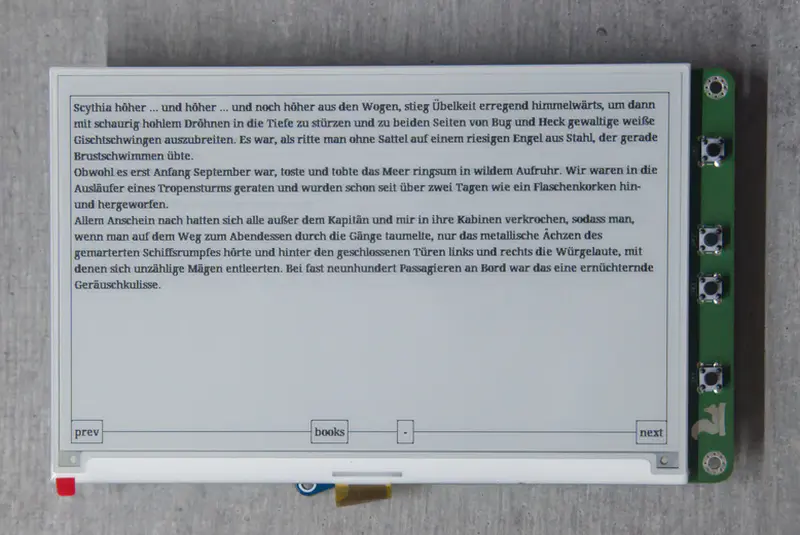
Overview
ZEReader is an open-source firmware project designed for a DIY eBook reader ecosystem. Built on the Zephyr Real-Time Operating System (RTOS), it provides a highly portable and modular foundation for building e-ink devices. The project is currently in a Proof-of-Concept (PoC) stage, demonstrating that modern microcontroller units (MCUs) like the Raspberry Pi Pico series are capable of handling complex document formats like EPUB without the need for high-power application processors.
Hardware and Platform Support
The firmware is designed to be flexible through Zephyr’s device tree system, but primary development and testing focus on the following hardware components:
- Microcontrollers: Raspberry Pi Pico 1 (RP2040) and Raspberry Pi Pico 2 (RP2350).
- Display: Waveshare 7.5” ePaper displays (specifically the Gooddisplay GDEW075T7 and GDEY075T7) utilizing the UC8179 controller.
- Storage: SD Card Reader via SPI for storing book libraries.
- Input: A 4-button navigation system for page turns and menu interaction.
For those without the physical hardware, ZEReader supports the Zephyr native_sim target. This allows developers to run the firmware on a Linux host, using emulated flash storage to simulate an SD card, which significantly accelerates UI development and debugging.
Technical Implementation
ZEReader leverages several powerful components within the Zephyr ecosystem to achieve its functionality:
- Zephyr RTOS: Provides the kernel, hardware abstraction layer, and build system (West), ensuring the project can be ported to different MCUs with minimal code changes.
- LVGL (Light and Versatile Graphics Library): Used for the user interface, managing the rendering of text and navigation elements on the ePaper display.
- FatFS: Manages the file system on the SD card, allowing the firmware to navigate directories and open EPUB files.
- EPUB Parsing: The firmware includes logic to handle (X)HTML formatting within EPUB files, allowing for a structured reading experience that respects the original document’s order while skipping over unsupported elements like embedded images in the current PoC.
Development and Debugging
The project follows standard Zephyr development patterns. It uses the west tool for workspace management and dependency tracking. For debugging, the project is configured to work with the Blackmagic Debug Probe via SWD, enabling developers to set breakpoints and step through code directly on the RP2040/RP2350 hardware.
One interesting aspect of the build system is the use of Device Tree Overlays. This allows the same application code to run on a standard Raspberry Pi Pico or the custom ZEReader Rev1 PCB by simply swapping the board target or overlay file during the build process.
Current Capabilities and Future Goals
At its current stage, ZEReader successfully demonstrates the ability to read EPUB files directly from storage. It handles the (X)HTML content and provides basic navigation. Future development is focused on moving configuration options to Kconfig for better Zephyr integration, improving the UI responsiveness, and tuning the ePaper refresh rates to provide a smoother reading experience. The project serves as an excellent reference for developers looking to build low-power, display-centric IoT devices using Zephyr.