Weather Micro Station for T-Display S3
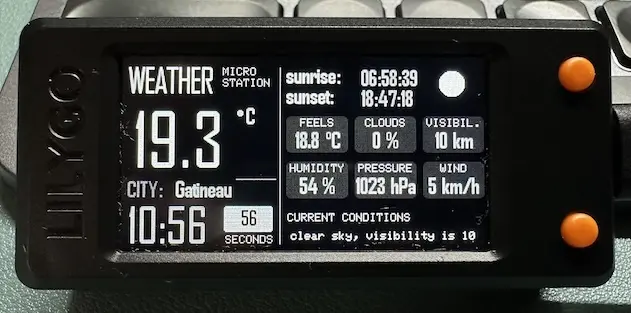
A modular, high-performance weather display system for the LilyGO T-Display S3 powered by an ESP32-S3. It provides real-time weather updates via the OpenWeatherMap API, featuring a smooth 40 FPS UI, automatic NTP time synchronization, and robust error recovery.
Overview
The Weather Micro Station is a sophisticated, modular weather display system designed specifically for the LilyGO T-Display S3. Built on the ESP32-S3 platform, this project transforms a compact microcontroller board into a professional-grade weather monitor. It fetches real-time data from the OpenWeatherMap API and presents it through a highly optimized user interface that features smooth animations and a high-performance scrolling ticker.
Hardware and Performance
The project is tailored for the LilyGO T-Display S3, leveraging its vibrant display and the processing power of the ESP32-S3. A key highlight of the system is its performance optimization; the UI runs at a consistent 40 FPS, providing fluid transitions and a professional feel. To achieve this, the application utilizes font caching, message buffering, and efficient memory management to ensure the hardware remains responsive even during network operations.
Modular Architecture
The codebase is designed with maintainability and clarity in mind, following a modular architecture that separates concerns into distinct classes:
- WeatherDisplay: Manages UI rendering, font handling, and the 40 FPS animation engine.
- WeatherAPI: Handles network operations, including secure HTTPS requests to OpenWeatherMap and JSON parsing via ArduinoJson.
- WeatherData: Defines the data structures and state management for the application.
- Main Orchestration: A clean main loop that manages timing, state transitions, and hardware button interrupts for features like brightness control.
Key Features
- Real-time Data: Fetches current weather conditions every 3 minutes, including temperature, humidity, pressure, wind speed, and visibility.
- Visual Weather Icons: Includes a set of 18 different weather condition icons (RGB565 format) that automatically update based on the API response.
- Time Synchronization: Automatically synchronizes with NTP servers every 30 minutes to maintain accurate local time.
- Scrolling Ticker: A smooth, 40Hz scrolling message bar at the bottom of the screen provides detailed weather summaries.
- Robust Connectivity: Features automatic WiFi reconnection logic and comprehensive API error handling to ensure the display remains updated without manual intervention.
Configuration and Setup
The project uses a centralized configuration approach. Users define their specific settings in src/config.h, including unit systems (Metric or Imperial), timezones (using POSIX TZ strings), and update intervals.
Security is handled via a secrets.h file, which keeps sensitive information like WiFi credentials and API keys out of version control. A typical configuration in secrets.h looks like this:
#define OPENWEATHERMAP_API_KEY "your_api_key_here"
#define WIFI_SSID "your_wifi_network"
#define WIFI_PASSWORD "your_wifi_password"
#define OPENWEATHERMAP_CITY "Your_City,CountryCode"
Development Tools
Beyond the core application, the repository includes several tools for developers, such as a Python-based call graph generator and runtime function tracing headers. These tools assist in performance monitoring and call stack depth tracking, making it easier to extend the project or optimize it further for specific use cases.