USB Video Class (UVC) for Raspberry Pi Pico
This project implements a USB Video Class (UVC) firmware for the Raspberry Pi RP2040, enabling video streaming from an OV2640 camera to a host computer. It utilizes the TinyUSB stack for USB connectivity and provides optional FreeRTOS support for task management, while also driving an ILI9341 LCD for local preview using PIO-based drivers.
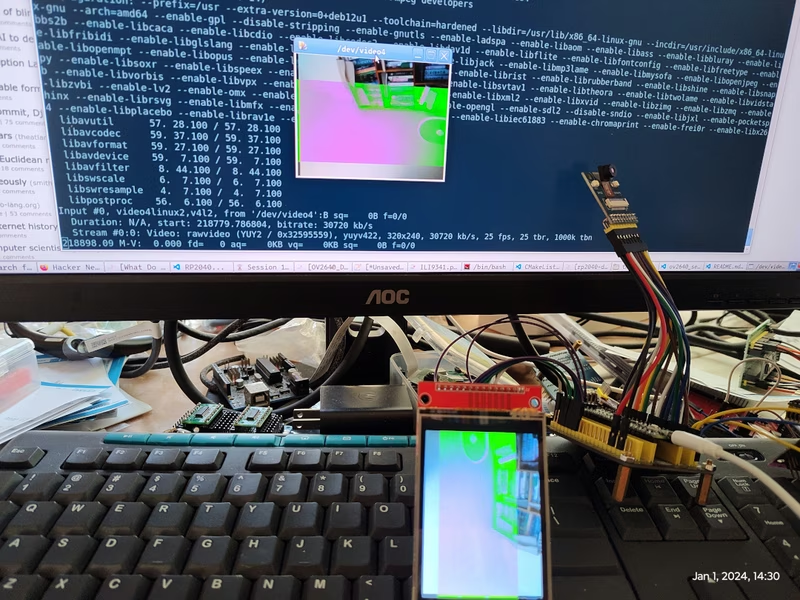
The Raspberry Pi Pico is a versatile microcontroller, but handling real-time video streaming is a significant challenge for its dual-core ARM Cortex-M0+ architecture. The rp2040-uvc project addresses this by turning the RP2040 into a standard USB Video Class (UVC) device, allowing it to act as a webcam or video capture card for a host computer.
At its core, the project bridges a camera sensor, a local display, and a USB host. By utilizing the Raspberry Pi Pico’s unique hardware features, it achieves efficient data handling that would typically require a much more powerful processor.
Hardware Architecture
The system is built around three primary hardware components:
- RP2040 Microcontroller: The heart of the system, managing the USB stack and data routing.
- OV2640 Camera Module: A popular 2MP image sensor that provides the raw video feed.
- ILI9341 LCD Module: A 2.8-inch TFT display used for a local preview of the camera feed.
One of the most impressive aspects of this implementation is the use of the RP2040’s Programmable I/O (PIO) blocks. The project includes custom PIO programs to handle the high-speed timing requirements of both the camera interface and the LCD. The image.pio routine synchronizes with the camera’s HSYNC and PCLK signals to capture pixel data into the RX FIFO, while the ili9341_lcd.pio handles the high-speed serial clocking required for a smooth display update.
Software and RTOS Integration
The project relies on the TinyUSB library to handle the complexities of the UVC protocol. This allows the Pico to be recognized by modern operating systems as a standard video device without the need for custom drivers.
For task management, the developer provides an option to use FreeRTOS. By compiling with the USE_FREERTOS=1 flag, the system can more effectively manage the concurrent tasks of capturing frames, updating the local LCD, and streaming data over USB. While a standard main loop is supported, FreeRTOS is the recommended path for better stability and performance.
Handling Pixel Formats
There are two primary ways to handle the data flow between the sensor, the display, and the UVC stream:
- RGB565 Priority: If the OV2640 is set to RGB565, the frame buffer can be written directly to the LCD. The system then performs a conversion from RGB565 to YUV422 for the UVC stream.
- YUV422 Priority: If the sensor outputs YUV422, the data goes directly to the UVC stream. The system must then convert YUV422 to RGB565 for the local LCD preview.
The project notes that the YUV422-to-LCD path currently faces some challenges with visual artifacts, making the RGB565 path the more stable choice for most users.
Usage and Testing
Because the project adheres to the UVC standard, it works seamlessly with standard Linux video tools. Users can query the device capabilities using v4l2-ctl:
v4l2-ctl -d 0 --list-formats-extThis reveals that the device supports YUYV 4:2:2 at a resolution of 320x240, with frame rates ranging from 1 to 25 fps depending on the configuration. For real-time viewing, standard tools like ffplay can be used to open the stream directly from the device node:
ffplay -f v4l2 -framerate 25 -video_size 320x240 -i /dev/video0This project serves as an excellent reference for anyone looking to implement high-speed data peripherals on the RP2040 or exploring the capabilities of the TinyUSB UVC stack.