Scara Drawing Robot
An ESP32-based SCARA drawing robot that utilizes three servo motors for articulated movement. It features a modern web-based control interface built with Preact and uses the Arduino framework for firmware management and asynchronous web serving.
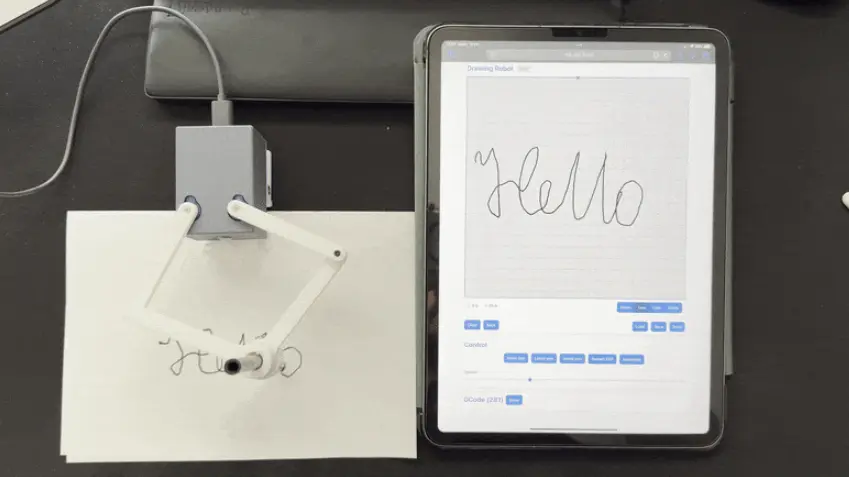
Overview
The Scara Drawing Robot is an open-source hardware and software project designed to create a functional drawing arm using the SCARA (Selective Compliance Assembly Robot Arm) configuration. Driven by an ESP32 microcontroller—specifically targeting the Lolin C3 Mini or ESP32-S3—the robot coordinates three servo motors to translate digital coordinates into physical drawings.
The project is notable for its integration of a modern web stack with embedded firmware, allowing users to control the robot through a browser-based interface without needing dedicated desktop software.
Technical Architecture
The system is divided into two primary components: the firmware and the web application.
Firmware and Build System
Built using the PlatformIO ecosystem on the Arduino framework, the firmware manages the kinematics of the SCARA arm and handles network communication. It leverages several key libraries to provide a robust user experience:
- ESP32Servo: For precise control of the three servos.
- WiFiManager: To handle network provisioning and captive portal setup.
- ESPAsyncWebServer: To serve the control interface and handle API requests asynchronously.
- ArduinoJson: For parsing movement commands and configuration data.
The project includes custom Python build scripts (prebuild.py and merge-bin.py) that automate the development workflow. The prebuild.py script is particularly interesting as it automatically compiles the Preact web application, converts the resulting assets into C++ header files (hexdumps), and embeds them directly into the firmware binary. This allows the ESP32 to serve a complex single-page application (SPA) directly from its internal flash memory.
Web Interface
The frontend is built with Preact, a fast, lightweight alternative to React. This interface allows users to interact with the robot, send drawing commands, and monitor status. By using mDNS, the device is accessible on local networks via the drawer.local domain, providing a seamless “plug-and-play” experience once the initial WiFi configuration is complete.
Hardware and Mechanics
The physical robot is designed to be 3D printed. The mechanical design accommodates three servos: two for the primary arm segments (linkages) and one for the drawing implement (pen lift). Users can find the 3D models on MakerWorld, specifically designed for the Tenstar C3 Mini form factor.
Key mechanical parameters, such as the distance between servos and the lengths of the linkages, are fully configurable within the include/config.h file, allowing users to adapt the software to custom arm dimensions or different mechanical tolerances.
Getting Started
For users looking to build the project, the repository supports two paths:
- Flash Ready-to-Use Firmware: Users can download pre-merged binaries from the GitHub releases page and flash them using the web-based ESPHome Flasher.
- Build from Source: Developers can clone the repository, customize the
config.hfile, and use PlatformIO to build and upload the project. Runningpio run -t mergebinwill generate a single flashable image containing the bootloader, partition table, and application code.
Once powered on, the robot automatically homes its servos and establishes a network connection, at which point the web interface becomes the primary point of control.