Pico-CEC
A Raspberry Pi Pico-based bridge that converts HDMI CEC (Consumer Electronics Control) signals into USB HID keyboard inputs, enabling TV remote control for media centers like Kodi. It utilizes FreeRTOS for task management and supports both RP2040 and RP2350 microcontrollers.
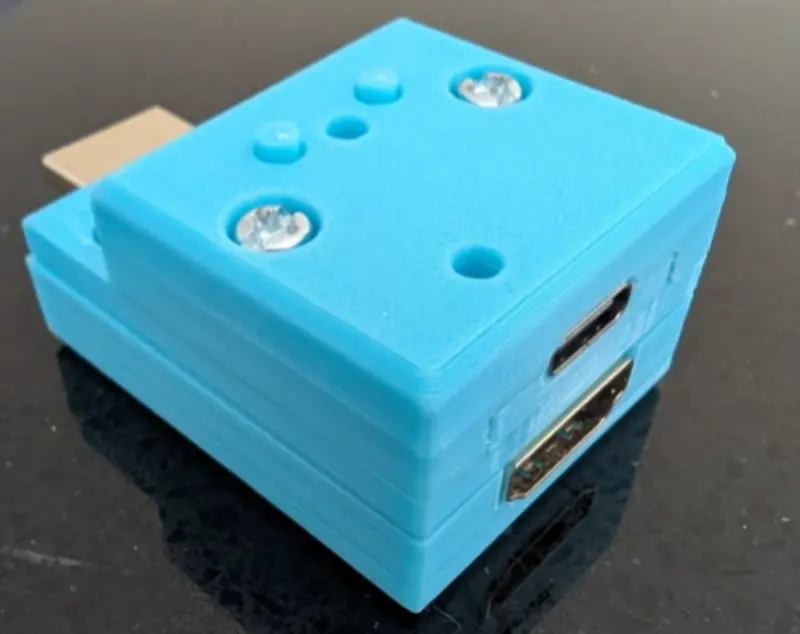
Pico-CEC is an open-source project designed to bridge the gap between home theater PCs and television hardware. Many budget-friendly or repurposed micro-desktops used as media players—especially those running Kodi or LibreELEC—lack native support for HDMI Consumer Electronics Control (CEC). This often forces users to rely on additional peripherals like wireless keyboards or game controllers just to navigate a menu. Pico-CEC solves this by using a Raspberry Pi Pico to intercept CEC signals from the HDMI bus and translate them into standard USB HID keyboard commands.
Hardware and Design
The project originally targeted the RP2040 but has recently been upgraded to support the RP2350, specifically favoring the Seeed Studio XIAO RP2350 for its compact form factor. The hardware implementation is remarkably efficient because both the HDMI CEC bus and the Pico’s GPIO operate at 3.3V, eliminating the need for complex level shifters. The system connects to the HDMI Display Data Channel (DDC) for EDID parsing to determine the physical address and monitors the dedicated CEC pin for control messages.
The physical assembly typically involves an HDMI male/female passthrough adapter (such as the WP-905), allowing the Pico to sit “in-between” the media player and the TV. A custom 3D-printed enclosure, modeled in OpenSCAD, provides a professional housing for the microcontroller and the HDMI adapter, resulting in a clean, plug-and-play device.
Software Architecture
The firmware is built on FreeRTOS, utilizing a multi-tasking approach to handle the strict timing requirements of the CEC protocol. The system is divided into several key tasks:
- cec_task: This is the core of the project, managing the low-level HDMI CEC protocol. It uses an edge-interrupt-driven state machine for receiving packets and an alarm-interrupt-driven state machine for sending them. This interrupt-based design ensures the system consistently meets CEC timing windows that are difficult to achieve with simple busy-wait loops.
- hid_task: Acts as a bridge, reading user control messages from a queue and preparing them for the USB stack.
- usbd_task: Handles the USB device stack via TinyUSB, presenting the Pico to the host computer as a standard HID keyboard.
- blink_task: Provides visual diagnostics via an RGB LED, indicating whether the system is in standby, active, or has encountered a crash.
Features and Compatibility
Pico-CEC supports a wide range of standard CEC operations, including navigation arrows, select, back, play, pause, and numeric input. These are pre-mapped to common Kodi shortcuts, making the setup process seamless for LibreELEC users. The project also includes a Command Line Interface (CLI) accessible over a serial port, which allows users to toggle debug logging and monitor all CEC traffic on the bus in real-time.
One of the project’s standout achievements is its focus on reliability and standards compliance. The firmware passes the cec-compliance test suite found in the Linux v4l-utils package and has proven stable under extended fuzz testing.
Getting Started
Building the project requires the standard Raspberry Pi Pico SDK environment and CMake. Users can customize the build by specifying their board type (e.g., PICO_BOARD=pico) or changing the GPIO pin used for CEC communication. Once built, the resulting .uf2 file is flashed to the Pico via the standard bootloader mode. The project is highly extensible, with future goals including the implementation of CEC logic using the RP2040/RP2350 Programmable I/O (PIO) blocks to further reduce CPU overhead.