Kawaii Useless Robot
An ESP32-powered interactive robot that combines the classic 'useless box' concept with mobility and facial expressions. It leverages FreeRTOS to coordinate dual-core operations for LED matrix animations, servo-controlled mechanical arms, and stepper-driven movement.
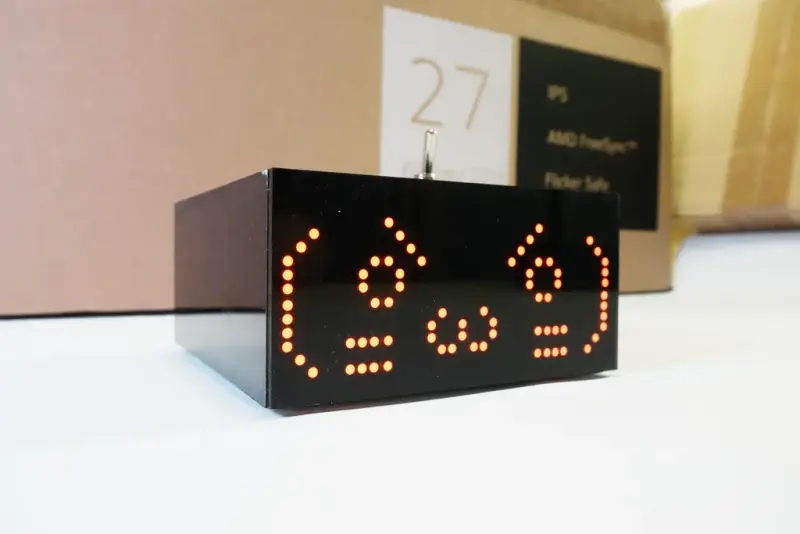
The Kawaii Useless Robot is a creative evolution of the classic ‘useless box’—a device whose sole purpose is to turn itself off. This project takes that concept and adds a layer of personality and mobility, resulting in a robot that doesn’t just flip a switch, but reacts with facial expressions and can even drive away if it feels ‘pushed’ too hard. Built around the ESP32, the robot utilizes the microcontroller’s dual-core capabilities and FreeRTOS to manage a complex array of hardware peripherals and behavioral logic.
Hardware and Architecture
At its core, the robot is powered by an ESP32 (specifically tested with the ESP32E), which provides the necessary processing power and wireless connectivity. The hardware stack is impressively dense for its size:
- Visuals: A 32x16 LED matrix serves as the robot’s face, rendering ‘kawaii’ animations stored on an SD card.
- Actuators: Two independent servos control the cover and the pusher arm that interacts with the main switch.
- Locomotion: Stepper motors drive the wheels, allowing the robot to move and rotate. To save on GPIO pins, the stepper drivers are controlled via a serial-to-parallel shift register mechanism.
- Connectivity: Integrated WiFi allows for web-based control and remote debugging.
Multi-Core Logic with FreeRTOS
To ensure smooth performance, the firmware is designed to run on both of the ESP32’s cores. Using FreeRTOS primitives like tasks, semaphores, and mutexes, the system separates time-critical motor control and animation rendering from the network stack. This prevents the LED animations from stuttering while the robot is handling web requests or processing stepper motor steps.
The animation system is particularly sophisticated; it loads binary frame data from an SD card and renders it to the matrix using the MD_MAX72xx library. This allows for a wide variety of expressions without consuming the ESP32’s internal flash memory.
Interaction Modes
The robot supports three primary modes of operation:
- Default Mode: The robot acts as a standalone interactive device. When the user flips the physical switch, the robot triggers a randomized sequence of responses, which might include hesitations, aggressive switch-flipping, or annoyed facial expressions.
- AP Mode: The robot acts as a wireless Access Point. When a user connects via a smartphone, a captive portal automatically launches a web-based control panel. From here, users can manually trigger movements, change facial expressions, and manage files on the internal SD card.
- WiFi Debug Mode: Designed for developers, this mode connects the robot to a local home network, allowing for easier firmware testing and web interface debugging.
Behavioral Intelligence
What sets this project apart is its reactive logic. The firmware includes ‘struggle’ detection; if a user holds the switch in position to prevent the robot from flipping it back, the robot senses the resistance. It will retry with different patterns, play specific ‘angry’ animations, or eventually use its stepper motors to drive away from the user, reinforcing its ‘useless’ yet stubborn persona.