Home Assistant Security Camera with ESP32-Cam
A DIY security camera project using an ESP32-Cam integrated into Home Assistant via ESPHome. It features live video streaming, pan-tilt control using SG90 servos, and environmental monitoring with a DHT22 temperature and humidity sensor.
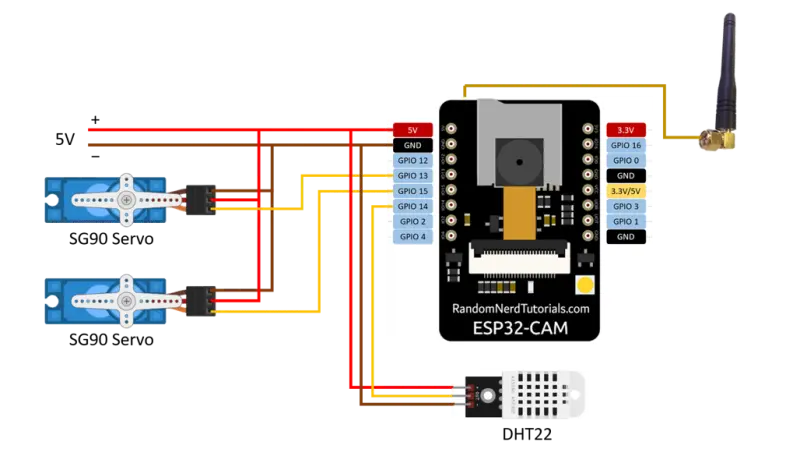
Overview
The ESP32-Cam is a versatile and affordable module that combines a powerful ESP32 microcontroller with a compact camera. This project leverages the ESPHome framework to transform the ESP32-Cam into a fully integrated security camera for the Home Assistant ecosystem. By combining video streaming with physical movement and environmental sensing, it creates a multi-functional IoT device for home automation.
Key Features and Capabilities
This project goes beyond simple video streaming by utilizing the GPIO pins of the ESP32 to incorporate several hardware components:
- Pan and Tilt Control: Using two SG90 servos, the camera can move horizontally and vertically. These are controlled via the Home Assistant UI using template numbers and buttons, allowing for remote positioning.
- Environmental Sensing: A DHT22 sensor provides real-time temperature and humidity data, turning the security camera into a localized weather station.
- Integrated Illumination: The onboard LED (GPIO4) is configured as a flashlight, which can be toggled remotely to provide light in dark environments.
- Wireless Integration: The system connects to Home Assistant via Wi-Fi, utilizing the ESPHome API for seamless communication and Over-The-Air (OTA) updates.
Technical Implementation
The core of the project is the ESPHome configuration file. This YAML-based setup defines the hardware pinout for the camera’s data bus (D0-D7, VSYNC, HREF, etc.) and the I2C communication for camera control.
Servo Control
The servos are driven using the ledc platform, which provides the necessary PWM signals at a 50Hz frequency. The configuration includes logic to increment or decrement the servo position through button presses in the Home Assistant dashboard, with an auto_detach_time to save power and prevent jitter when the servos are not moving.
Sensor Data
The DHT22 sensor is polled every 60 seconds. The data is then transmitted to Home Assistant, where it can be used for automation triggers, such as turning on a fan if the temperature exceeds a certain threshold.
Getting Started
To deploy this project, the ESP32-Cam must first be connected to a computer using a USB-to-TTL converter for the initial firmware flash. Once the base ESPHome configuration is installed and Wi-Fi credentials are set, the device can be managed entirely through the Home Assistant web interface.
For optimal performance, the project recommends a stable 5V power supply—such as a dedicated phone charger—to handle the power spikes caused by image transmission and servo movement. Additionally, using an external 2.4G antenna is suggested to maintain a strong signal for high-bandwidth video streaming.