ESPHome Treadmill FTMS
A comprehensive treadmill computer replacement based on the ESP32-S3 and ESPHome firmware. It implements the Fitness Machine Service (FTMS) protocol to enable direct Bluetooth connectivity with fitness apps like Zwift and Kinomap while controlling treadmill hardware via UART.
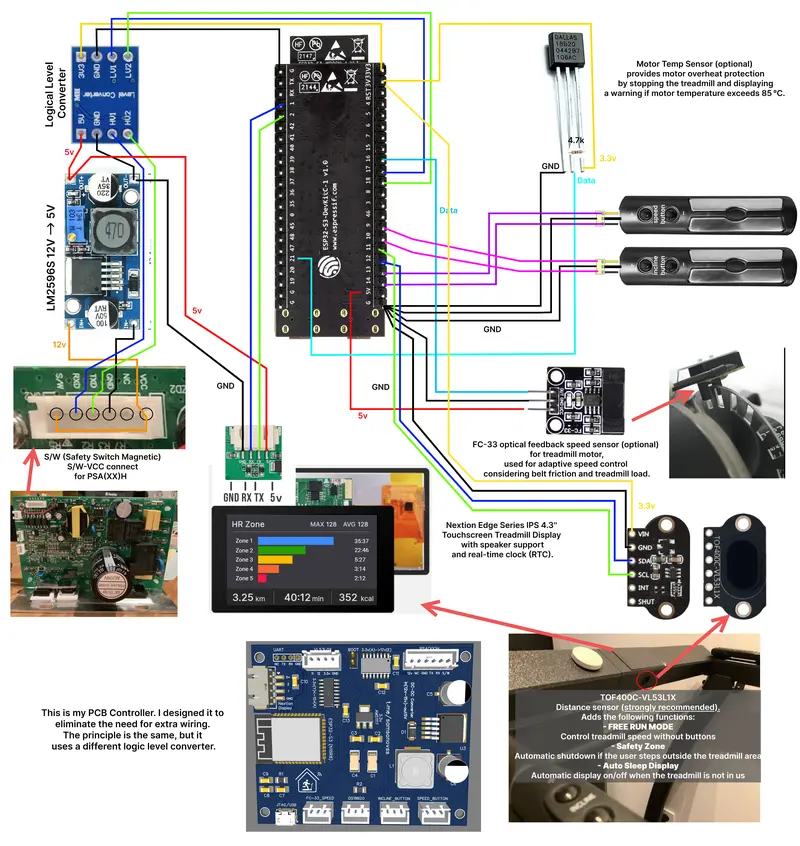
Modernizing Fitness Hardware with ESPHome
The ESPHome Treadmill FTMS project provides a sophisticated solution for transforming traditional treadmills into smart, connected training machines. By replacing the original, often bulky and limited onboard computer with an ESP32-S3 running ESPHome, users can unlock advanced features like direct app integration, heart rate-based training programs, and custom dashboards. The project is specifically designed for treadmills utilizing PSA(xx) controller boards but is adaptable to any model that supports UART communication.
Core Functionality and FTMS Integration
At the heart of this project is the implementation of the Fitness Machine Service (FTMS) protocol. This allows the treadmill to communicate directly with popular fitness platforms such as Zwift, Kinomap, and FitShow via Bluetooth Low Energy (BLE). Unlike many other solutions that require intermediate bridges or third-party apps to translate signals, this implementation runs natively on the ESP32-S3, ensuring low latency and high reliability.
The system handles bidirectional data flow: it transmits real-time speed and incline data to the fitness app while receiving control commands to adjust the treadmill’s parameters. This creates an immersive experience where virtual terrain in an app like Zwift can automatically adjust the physical incline of the treadmill.
Technical Architecture and UART Parsing
The project interfaces with the treadmill’s lower motor control board via UART. By reverse-engineering the communication protocol (e.g., commands like [SETSPD:010] for 1 km/h), the ESP32-S3 takes full control of the hardware. This approach allowed the developer to completely remove the original upper console, which often obstructs the view when using a tablet or monitor.
To facilitate this, the project includes a detailed guide on UART parsing, helping users sniff traffic between their original console and the motor controller to adapt the firmware to different treadmill brands. The use of a level shifter is recommended to safely interface the 12V logic of many treadmill boards with the 3.3V logic of the ESP32.
Smart Training and Automation
Beyond simple connectivity, the project introduces intelligent training logic:
- Heart Rate Control (HRC): The system can connect to BLE heart rate monitors and automatically adjust treadmill speed to keep the runner within a specific heart rate zone.
- Adaptive Speed Correction: An algorithm that accounts for user weight and belt friction to maintain precise speed accuracy.
- Automated Workouts: Built-in support for warm-up and cool-down cycles, as well as HIIT and fat-burning programs that transition between heart rate zones.
- Safety Features: Integration with TOF (Time-of-Flight) sensors like the VL53L1X allows for “Safe Zone” operation, where the treadmill automatically stops if the user steps off the belt.
User Interface and Ecosystem
For local control, the project supports Nextion touch displays, providing a minimalist and high-resolution interface for speed, time, and distance. Simultaneously, the project integrates deeply with Home Assistant (Hassio), allowing for a full-featured dashboard where users can track workout history, visualize data in Grafana, and configure user profiles (age, weight, gender) for accurate calorie and VO2 max calculations.
Getting Started
The project is configured via a standard ESPHome YAML file, making it accessible to those already familiar with the ESPHome ecosystem. Users need to define their UART pins, BLE client addresses for heart rate monitors, and specific GPIO pins for physical buttons if desired. The repository provides comprehensive documentation on hardware requirements, including recommended voltage converters (LM2596S) and speed sensors (FC33) for calibration.