ESPHome Hitachi H-Link AC Component
An ESPHome component designed to interface with Hitachi air conditioners using the serial H-Link protocol. It serves as a local, open-source alternative to proprietary cloud adapters, providing full integration with Home Assistant. The project supports a wide range of features including climate control, outdoor temperature sensing, and maintenance alerts on ESP32 and LibreTiny hardware.
Overview
The ESPHome H-Link AC component provides a powerful, local-first solution for controlling Hitachi air conditioning units. By leveraging the H-Link serial protocol, this project allows users to bypass proprietary cloud-based adapters like the SPX-WFGXX series, enabling native integration into Home Assistant via ESPHome. This approach not only improves privacy and reliability but also offers deeper access to device data that cloud services often omit.
The H-Link Protocol
H-Link is a serial communication protocol used by Hitachi for interaction between climate units and external controllers. It operates over a serial bus using a request-response model. The protocol supports two primary frame types: status inquiries (prefixed with MT) and status change requests (prefixed with ST).
Through reverse engineering, this component implements the logic required to poll for current states—such as power, mode, and temperature—and send commands to modify them. Communication is secured via a 16-bit XOR checksum to ensure data integrity over the serial line.
Hardware Implementation
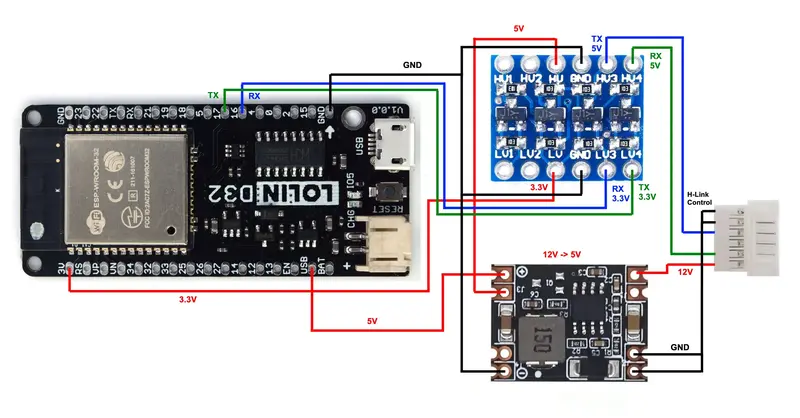
Integrating this component requires interfacing with the AC unit’s internal CN7 port. This port typically provides a 12V power line and operates at 5V logic levels. A standard implementation involves:
- Microcontroller: An ESP32 (such as the Lolin D32) or a LibreTiny-compatible board.
- Power Management: A step-down converter to reduce the 12V line to 5V for the microcontroller.
- Logic Level Shifting: A 3.3V-to-5V shifter for the Tx/Rx lines to ensure safe communication between the ESP32 and the AC unit.
- Physical Connection: A JST 6-pin PA-6P-TOP connector (2.0 mm pitch).
Supported Features
The component exposes a comprehensive set of entities to Home Assistant, covering almost every aspect of the AC unit’s operation:
- Climate Control: Full support for HVAC modes (Heat, Cool, Dry, Fan, Auto), fan speeds (Quiet to High), and swing modes (Vertical and Horizontal).
- Sensors: Real-time monitoring of outdoor temperature and auto-mode temperature offsets.
- Maintenance: Binary sensors for air filter cleaning reminders and buttons to reset those warnings.
- Diagnostics: Text sensors for model identification and advanced debug sensors for protocol sniffing.
- Device Control: Switches for toggling the internal beeper and locking the physical IR remote control.
Configuration and Usage
Setting up the component within ESPHome is straightforward. It requires defining a UART bus with a baud rate of 9600 and ODD parity. The component is then added as an external source. Below is a basic configuration example:
uart:
  id: hitachi_bus
  tx_pin: GPIOXX
  rx_pin: GPIOXX
  baud_rate: 9600
  parity: ODD

external_components:
  - source:
      type: git
      url: https://github.com/lumixen/esphome-hlink-ac.git
    components: [hlink_ac]

climate:
  - platform: hlink_ac
    name: "Living Room AC"
    supported_swing_modes:
      - "OFF"
      - VERTICAL
      - HORIZONTAL
      - BOTH
Advanced Debugging and Discovery
For users with unsupported models or those interested in protocol research, the component includes built-in discovery tools. The debug_discovery sensor can scan the entire 16-bit address range of the H-Link protocol to identify unknown registers. Additionally, users can send raw H-Link frames via Home Assistant actions to test specific commands or observe how the AC unit responds to different parameters, making it a versatile tool for the hardware hacking community.