ESP32-C3 Supermini OLED Display Driver
A technical implementation and hardware guide for the ESP32-C3 Supermini board equipped with a 0.42-inch OLED. It provides a specific software workaround for the U8g2 library to support the non-standard 72x40 resolution using coordinate offsets. The project includes pin mappings and an Arduino-based example for I2C display communication.
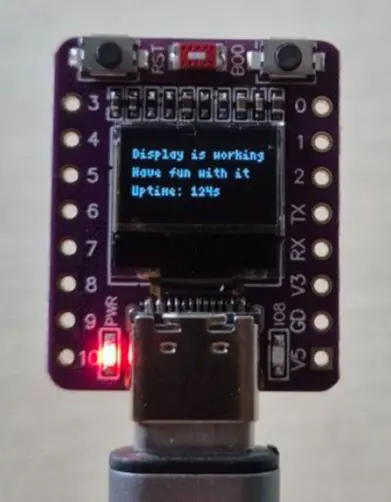
The ESP32-C3 Supermini is a compact and cost-effective development board based on the RISC-V architecture. While these boards are widely available on various platforms, they often arrive with little to no technical documentation, particularly regarding the integrated 0.42-inch OLED display. This project addresses those documentation gaps by providing the necessary pin configurations and software workarounds to get the display running efficiently.
Hardware Specifications
The board features an OLED display with a resolution of 72x40 pixels. Communication is handled via the I2C protocol. According to the project’s findings, the specific pin mapping for the I2C bus is as follows:
- SDA: GPIO 5 (often labeled as D6 on the board)
- SCL: GPIO 6 (often labeled as D5 on the board)
- Resolution: 72x40 pixels
The U8g2 Library Workaround
A significant hurdle when using this hardware is that the standard U8g2 graphics library does not contain a dedicated constructor for a 72x40 resolution display. To solve this, the project utilizes a standard 128x64 SSD1306 constructor and applies a coordinate offset to align the graphics with the physical screen boundaries.
By defining an xOffset of 30 and a yOffset of 12, the 72x40 active area is centered within the 128x64 virtual buffer. This allows developers to use standard U8g2 drawing functions while ensuring the output is visible on the small 0.42-inch screen.
Software Implementation
The project includes a complete Arduino sketch (.ino) that demonstrates the initialization and usage of the display. Key implementation details include:
- Initialization: Using the
U8G2_SSD1306_128X64_NONAME_F_HW_I2Cconstructor with hardware I2C. - Performance: Setting the I2C bus clock to 400kHz for faster screen refreshes.
- Visuals: Setting the contrast to maximum to compensate for the small screen size.
- Buffer Management: Using the full frame buffer mode (
_F_) for flicker-free updates.
#include <U8g2lib.h>
#define OLED_RESET U8X8_PIN_NONE
#define OLED_SDA 5
#define OLED_SCL 6

// Workaround constructor
U8G2_SSD1306_128X64_NONAME_F_HW_I2C u8g2(U8G2_R0, OLED_RESET, OLED_SCL, OLED_SDA);

int xOffset = 30;  // Offset to center 72x40 display
int yOffset = 12;

void setup(void) {
  u8g2.begin();
  u8g2.setContrast(255);
  u8g2.setBusClock(400000);
}
This repository serves as an essential reference for developers working with the ESP32-C3 Supermini, transforming a poorly documented hardware module into a functional platform for IoT and wearable projects.