Digital Rain Clock
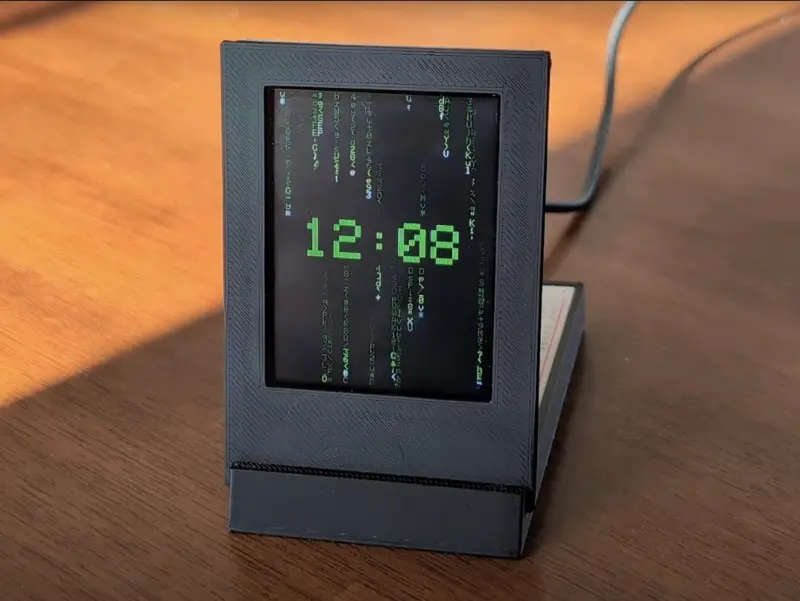
A Matrix-inspired desktop clock featuring animated digital rain on a 2.8-inch TFT touchscreen. Built with an Arduino Nano ESP32, the project combines real-time clock functionality with dynamic visuals, touch-based time adjustment, and customizable color schemes.
Overview
The Digital Rain Clock is a functional desktop accessory that brings the iconic “Matrix Code” visualization to life. It features a cascading animation of randomized characters, known as digital rain, which serves as the background for a real-time clock. The project is designed with a “maker-style” aesthetic, intentionally exposing the electronics behind a custom 3D-printed stand to highlight the hardware components.
Hardware Architecture
The system is powered by an Arduino Nano ESP32, which manages the complex rendering of the animation while maintaining accurate timekeeping. The display is an Adafruit 2.8” TFT breakout board, providing a 240x320 pixel full-color canvas and a capacitive touchscreen for user interaction.
To simplify the wiring between the processor and the display, the project utilizes the EYESPI connection standard. An 18-pin FPC cable connects the TFT to an EYESPI breakout board, which is then interfaced with the Nano ESP32 on a breadboard housed within the 3D-printed base.
Key Features
Animated Digital Rain
The core visual element is the digital rain animation. The firmware renders multiple columns of characters that fall vertically at varying speeds. Each trail features randomized characters, creating a dynamic and non-repeating streaming motion that mimics the classic cinematic effect.
Intelligent Time Overlay
The current time is displayed at the center of the screen. To maintain the visual immersion of the digital rain, the time digits are designed to gradually “dissolve” as they are overwritten by falling streaks of code. The time automatically reappears at the start of every minute, or users can trigger it manually by tapping the center of the screen.
Interactive Touch Controls
The project leverages the capacitive touch layer of the display for configuration without needing physical buttons:
- Time Adjustment: Tapping the top-right corner opens a hidden menu where users can increment hours and minutes.
- Color Customization: Tapping the bottom-left corner cycles the entire interface through five different color schemes: green, red, blue, yellow, and purple.
Technical Implementation
The firmware is written for the Arduino ecosystem, specifically targeting the ESP32 architecture. This allows the project to benefit from the ESP32’s high clock speed, which is necessary for maintaining a smooth frame rate during the rain animation while simultaneously processing touch interrupts and clock updates. The use of the EYESPI interface ensures high-speed SPI communication with the display, reducing flicker and latency in the rendering loop.