C++ Quiz on E-Ink Display
An ESP32-based application that displays daily C++ quiz questions on a 7.5-inch E-Ink screen. It utilizes a Google Sheets backend with Apps Script for content delivery and implements deep sleep for extended battery life.
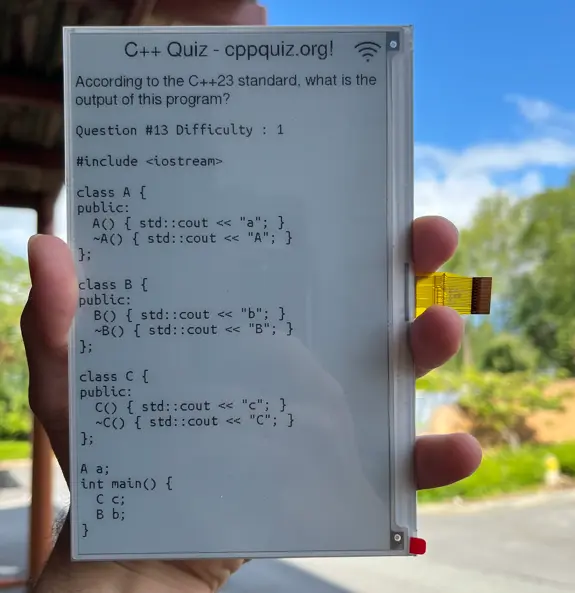
Overview
Learning C++ can be a daunting task, but this project offers a unique way to stay sharp by bringing daily quiz questions from the popular cppquiz.org directly to your desk via an E-Ink display. Powered by an ESP32 microcontroller, the system fetches questions from a managed Google Sheets backend and renders them with clean formatting on a high-contrast 7.5-inch electronic paper screen.
The project is designed for low power consumption and high reliability, ensuring that even if your Wi-Fi drops, you still have a question to ponder thanks to local caching mechanisms.
Technical Architecture
The system architecture is split between a cloud-based backend and the embedded firmware.
The Backend: Google Sheets & Apps Script
Because the source website provides questions in a large bulk JSON format rather than a granular API, this project uses a Google Sheets spreadsheet as an intermediary database. A Google Apps Script acts as the API endpoint for the ESP32. When the device requests a question, the script:
- Scans the sheet for the next unshown question.
- Marks the question as “shown” to prevent immediate repetition.
- Returns the question text, ID, and difficulty level as a plain text response.
The Firmware: ESP32 & Arduino
The firmware is built using the Arduino framework on the ESP32 platform. It handles the Wi-Fi connection, HTTP requests to the Google Script, and the complex rendering required for E-Ink displays. A key feature of the firmware is its power management; the device utilizes the ESP32’s deep sleep mode, waking up only once per hour to check for updates, which significantly extends battery life.
Hardware Components
To build this device, you need:
- Waveshare ESP32 E-Paper Driver Board: Provides the processing power and the specific interface logic for E-Ink panels.
- Waveshare 7.5” E-Paper Display: Offers a large, paper-like reading experience that remains visible without power.
- 3D Printed Case: While optional, the project is designed to fit into various online 3D-printable frames available for these specific screen sizes.
Key Features
- Offline Resilience: If the Wi-Fi connection fails during a wake cycle, the ESP32 automatically loads and displays the last successfully cached question from its internal memory.
- Status Indicators: The display includes a Wi-Fi status icon, letting the user know if the current question was freshly fetched or pulled from the cache.
- Configuration Mode: If Wi-Fi credentials are missing or connection fails, the device can create its own Access Point (AP), allowing users to configure settings via a web interface at
192.168.4.1. - Deep Sleep: The system is optimized for longevity, spending the vast majority of its time in a low-power state.
Configuration
Users can customize the firmware by updating the config.h file with their specific Wi-Fi credentials and the Deployment ID generated from their Google Apps Script:
const std::string wifi_ssid         = "YOUR_WIFI_SSID";
const std::string wifi_pwd          = "YOUR_WIFI_PWD";
const std::string gs_deployment_id  = "YOUR_GS_DEPLOYMENT_ID";
On the cloud side, the Google Apps Script handles the logic of iterating through the questions.xlsx data, ensuring a seamless flow of content to the device without requiring complex database hosting.