bbMonitor
An ESP32-based hardware performance monitor that visualizes computer system metrics through physical analog gauges and RGB lighting. The project leverages the Arduino framework and WebSockets to receive real-time data from a desktop companion app, providing a tactile and vintage-inspired dashboard for modern PC monitoring. It includes complete hardware design files, including PCB schematics and CAD drawings for the enclosure.
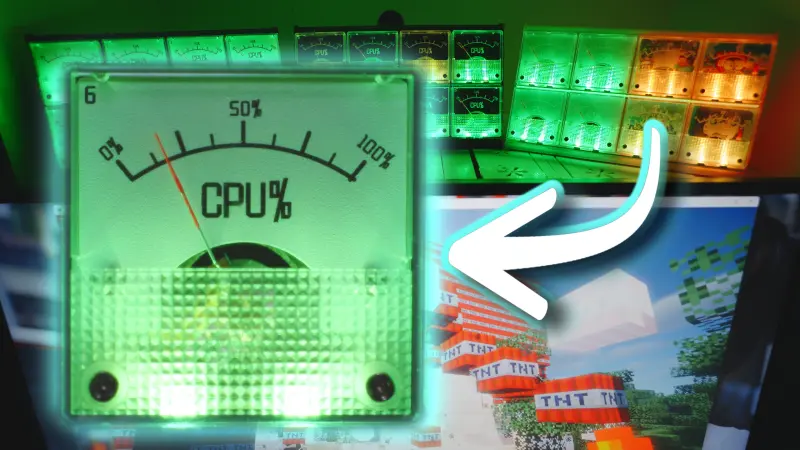
bbMonitor: Bringing Vintage Gauges to Modern PC Monitoring
bbMonitor is an innovative open-source project that bridges the gap between digital system monitoring and classic analog aesthetics. By combining the real-time performance data of a modern computer with the tactile feedback of physical pointers, bbMonitor creates a “performance dashboard” that makes system activity visible and engaging.
The Concept: A Dash of Gauges
The core idea behind bbMonitor is to take the performance metrics found in a computer’s Task Manager—such as CPU usage, memory load, or GPU temperature—and map them to physical gauges. When the computer is under heavy load, the pointers dance across the dials; during idle periods, they rest or sway gently. This physical interaction provides an intuitive sense of system health without needing to open software overlays or secondary monitors.
Technical Architecture
The project is built around the ESP32 microcontroller, utilizing the Arduino framework for its firmware. The system is divided into three main components:
- Firmware (bbMonitor.ino): The ESP32 acts as a WebSocket server, receiving JSON-formatted performance data over WiFi. It uses PWM (Pulse Width Modulation) to control the position of the analog pointers and manages RGB lighting effects via NeoPixel LEDs.
- Hardware (PCB & CAD): The repository includes complete PCB schematics and Gerber files for manufacturing the control board. Additionally, CAD drawings are provided for the physical enclosure, allowing users to 3D print or laser-cut a housing that fits the vintage aesthetic.
- Desktop Software (bbHome): A companion platform that runs on the host PC, collecting system metrics and streaming them to the bbMonitor hardware.
Key Firmware Features
The firmware implementation includes several sophisticated features to ensure a smooth user experience:
- Smooth Motion: Using the
Tickerlibrary and linear interpolation, the firmware ensures that pointer movements are fluid rather than jerky, even when data updates are infrequent. - NeoPixel Integration: The project uses
NeoPixelBusandNeoPixelAnimatorto provide visual feedback. The LEDs can change color based on system load (e.g., blending from green to red as CPU usage increases) or display rainbow animations during configuration. - Web-Based Configuration: Users can configure WiFi credentials and brightness settings through a WebSocket interface, with settings persisted in the ESP32’s non-volatile storage using the
Preferenceslibrary. - mDNS Discovery: The device supports mDNS, allowing the desktop software to find the “bbMonitor.local” device on the network without requiring a static IP address.
Hardware Interfacing
The ESP32 manages multiple output channels to drive the gauges. In the provided source code, up to 18 pins (P1 through P18) are defined for various control tasks, with a primary array of 8 pins dedicated to the main meter outputs. The use of analogWrite allows for fine-grained control over the pointer positions by varying the duty cycle sent to the gauge coils.
void tickMeter(){
  unsigned long currentTime = millis();

  for (int i = 0; i < sizeof(pins) / sizeof(pins[0]); i++) {
    int targetValue = targetPWMValues[i];
    int currentValue = currentPWMValues[i];

    float progress = (smoothTime > 0) ? float(currentTime - smoothStartTime) / smoothTime : 1.0;
    if(progress > 1.0) progress = 1.0;
    int newValue = currentValue + (targetValue - currentValue) * progress;
    analogWrite(pins[i], newValue);
    if(progress == 1.0){   //transition done
      currentPWMValues[i] = targetPWMValues[i];
    }
  }
}
Getting Started
For developers and makers, the project is fully open-source. The firmware can be compiled using the Arduino IDE with the ESP32 core installed. Required libraries include ArduinoJson for data parsing and NeoPixelBus for LED control. Once the hardware is assembled and the firmware is flashed, the device connects to the local network and waits for data from the bbHome desktop application.
Whether used as a functional tool for power users or as a unique piece of desk tech, bbMonitor demonstrates the creative potential of combining IoT hardware with desktop system integration.