Audio Stream Server for M5Cardputer
An audio streaming server for the M5Cardputer that captures microphone input at 16000 Hz and streams it to a web browser over Wi-Fi. It features on-device Wi-Fi configuration, NVM storage for credentials, and optimized power consumption through display management.
Overview
The Audio Stream Server for M5Cardputer is a specialized firmware that transforms the M5Cardputer—a portable ESP32-S3 based development kit—into a remote audio monitoring device. By leveraging the onboard microphone and Wi-Fi capabilities, this project captures real-time audio and serves it as a stream accessible via any standard web browser on the local network.
Key Features
The project focuses on ease of use and portability, providing a complete end-to-end solution for audio streaming. Key capabilities include:
- High-Quality Audio Capture: Captures microphone input at a sample rate of 16000 Hz, providing clear audio for remote listening.
- Web-Based Interface: Streams audio directly to a simple HTML interface, allowing users to listen from a smartphone, tablet, or PC without needing specialized software.
- On-Device Configuration: Includes a user interface on the M5Cardputer screen to scan for Wi-Fi networks and enter passwords using the device’s physical keyboard.
- Persistent Settings: Saves Wi-Fi credentials to Non-Volatile Memory (NVM), ensuring the device automatically reconnects after a reboot or power cycle.
- Power Optimization: Automatically sets the display brightness to a very low value during operation to extend battery life, which is critical for portable use cases.
Technical Implementation
The project is built using the Arduino framework and the PlatformIO build system, targeting the m5stack-stamps3 board (the core of the M5Cardputer). It utilizes the M5Cardputer library to manage the hardware peripherals, including the display, keyboard, and microphone.
Because it runs on the ESP32-S3, the system benefits from the underlying FreeRTOS kernel, which handles the concurrent tasks of audio sampling, network stack management, and the web server response loop. The audio is captured via I2S and served over HTTP, making it compatible with the built-in <audio> tag in modern web browsers.
Getting Started
Users can deploy the firmware using two primary methods:
- M5Burner: The easiest method for most users is to search for the project in the M5CARDPUTER section of the M5Burner tool and flash it directly.
- Manual Compilation: Developers can build the project from source using PlatformIO. The
platformio.inifile is pre-configured with the necessary dependencies and build flags for the ESP32-S3 architecture.
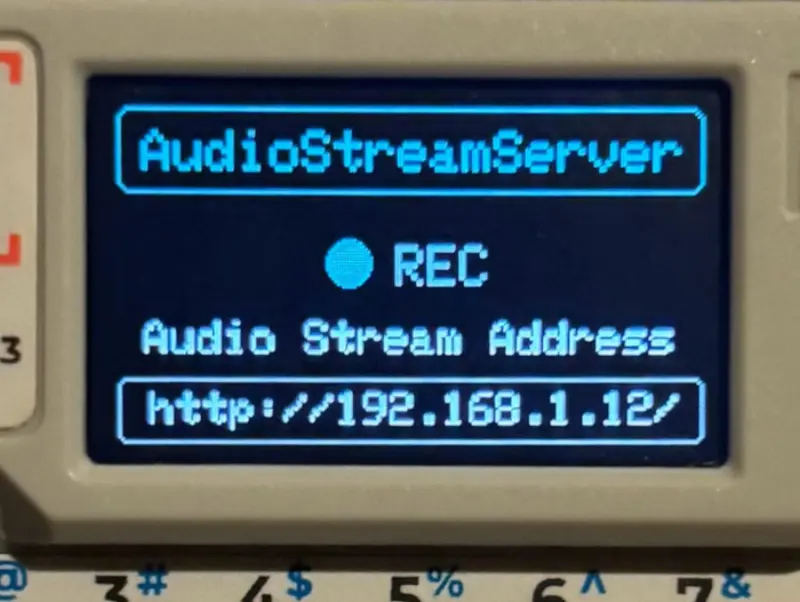
Once flashed, the M5Cardputer will prompt the user to scan for available Wi-Fi networks. After entering the password via the keyboard, the device displays its local IP address. Navigating to this address in a web browser opens the audio player interface, enabling the remote stream.