Anemoia-ESP32
A high-performance Nintendo Entertainment System (NES) emulator ported to the ESP32, capable of running games at native speeds with full audio. It leverages FreeRTOS for concurrent CPU and APU emulation and supports various memory mappers covering approximately 79% of the NES library.
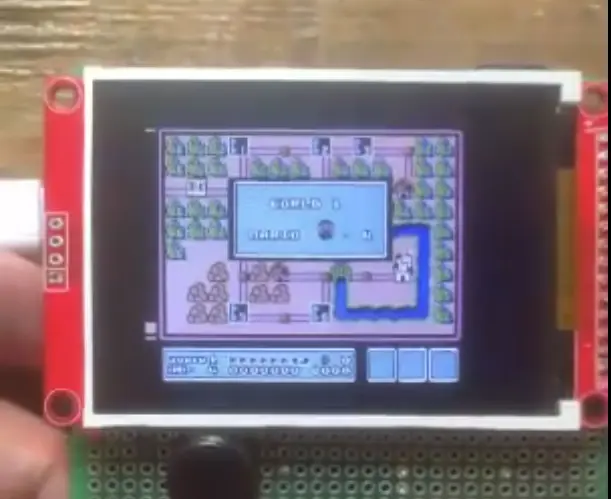
Overview
Anemoia-ESP32 is a specialized rewrite and port of the Anemoia Nintendo Entertainment System (NES) emulator, specifically optimized to run on the ESP32 microcontroller. Written in C++, the project focuses on achieving native NTSC speeds (~60.098 FPS) while maintaining full audio emulation. It transforms the ESP32 into a portable retro gaming console capable of running a significant portion of the classic NES library.
Performance and Compatibility
The emulator is heavily optimized for the Xtensa architecture. By utilizing custom build flags and specific compiler optimizations (such as -Ofast, -flto, and -funroll-loops), it maintains a steady 60 FPS for most popular titles. The project currently supports six major memory mappers:
- Mapper 0 (NROM): Super Mario Bros., Donkey Kong
- Mapper 1 (MMC1): The Legend of Zelda, Mega Man 2, Metroid
- Mapper 2 (UxROM): Contra, Castlevania
- Mapper 3 (CNROM)
- Mapper 4 (MMC3): Kirby’s Adventure
- Mapper 69 (FME-7)
These mappers account for roughly 79% of the total NES game catalog. While most games run at full speed, titles with complex bank-switching logic, like Kirby’s Adventure, may see slight performance variations.
Technical Implementation
Anemoia-ESP32 makes efficient use of the ESP32’s dual-core architecture and peripheral set. It utilizes FreeRTOS primitives to manage concurrent operations, specifically offloading the Audio Processing Unit (APU) to a separate task pinned to Core 0. This ensures that audio generation does not bottleneck the main CPU and PPU (Picture Processing Unit) emulation running on Core 1.
Audio and Video
Audio is handled via the ESP32’s internal DAC using the I2S driver, providing clear sound at a 44.1kHz sample rate. For video, the project integrates the TFT_eSPI library, supporting common displays like the ST7789 and ILI9341. It utilizes DMA (Direct Memory Access) for SPI communication to minimize CPU overhead during frame buffer transfers.
Input Methods
The emulator is flexible regarding hardware interfaces, supporting three distinct input methods:
- Standard GPIO tactile push buttons
- Original NES controllers (via shift register protocol)
- SNES controllers
Hardware Configuration
The system is designed to work with a standard ESP32 development board connected to a 320x240 TFT display and a MicroSD card module. The MicroSD card stores the .nes ROM files, which are loaded into memory via the SdFat or standard SD library.
void apuTask(void* param)
{
    Apu2A03* apu = (Apu2A03*)param;
    while (true)
    {
        apu->clock();
    }
}

IRAM_ATTR void emulate()
{
    Bus nes;
    nes.insertCartridge(cart);
    nes.connectScreen(&screen);
    nes.reset();

    // Create a dedicated task for the APU on Core 0
    xTaskCreatePinnedToCore(apuTask, "APU Task", 1024, &nes.cpu.apu, 1, &apu_task_handle, 0);

    while (true)
    {
        nes.controller = controllerRead();
        nes.clock(); // Generate one frame
        // Frame limiting logic to maintain 60 FPS
    }
}
Getting Started
To build the project, users need the Arduino IDE with the ESP32 board support package (specifically version 3.2.1 for optimal performance). The setup requires a custom platform.txt file provided in the repository to enable high-level compiler optimizations that are not active by default in the standard Arduino environment. Additionally, the TFT_eSPI library must be configured with a specific header file (Anemoia-ST7789.h) to match the project’s pinout and display requirements.