Main loop vs RTOS
Why a bare-metal main loop answers an urgent event only as fast as one pass of the loop, and how an RTOS kernel answers it at once.
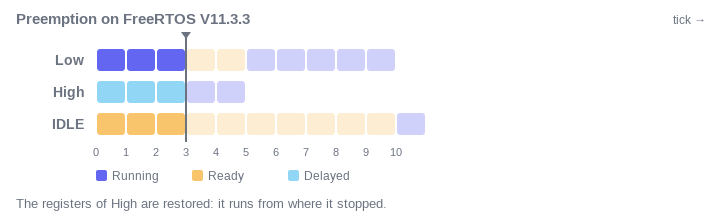
Simulated kernel: FreeRTOS V11.3.3 and Zephyr v4.5.0. This scenario and every other one are in the scheduler playground. The simulator and its data files are not covered by the site's CC BY-SA license; see their license notices.
Most microcontroller programs start life without an operating system. main() sets up the
hardware and then runs one loop forever, calling each job in turn. This is called a main loop
or superloop, and for small programs it is the right design: there is nothing to configure,
and every line runs in an order you can see.
This lesson shows where a main loop stops being enough, and what an RTOS kernel does instead. The simulator above already runs the RTOS version; we will get to it after the loop.
A main loop
int main(void)
{
    hardware_init();
    for (;;) {
        read_sensors();      /* a few microseconds */
        update_display();    /* slow: redraws a screen over SPI */
        check_button();      /* the urgent one */
        log_to_sd_card();    /* slow, and sometimes much slower */
    }
}
Each job must return quickly, because nothing else runs until it does. A job that has to wait for something (a byte from a UART, the SD card to finish writing) cannot simply wait: it checks whether the thing has happened, and if not, returns and tries again on the next pass. That is polling, and it turns every job into a small state machine that remembers where it was.
The cost shows up when an event is urgent. check_button() notices a press only when the loop
reaches it. If the press arrives just after the check, it waits for every other job to run once:
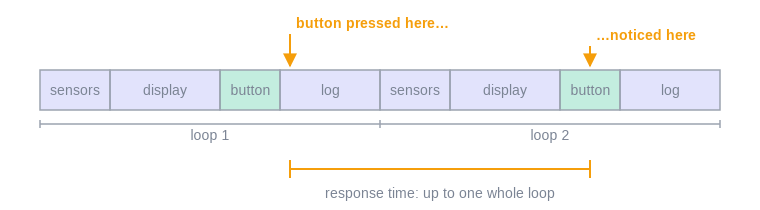
The worst-case response time of every job is one whole pass of the loop, and the pass is as long as all the jobs together. Adding a slow feature to one job makes every other job slower to respond, even jobs that have nothing to do with it.
Interrupts and flags
The usual fix is to move urgent work into interrupt handlers. The button raises an interrupt, and the handler runs within microseconds, whatever the loop is doing. But an interrupt handler has to be short: while it runs, the main loop and often the other interrupts are stopped. So the handler does the minimum and sets a flag:
volatile bool button_pressed;

void BUTTON_IRQHandler(void)
{
    clear_button_interrupt();
    button_pressed = true;      /* the real work happens in the loop */
}
and the loop checks button_pressed on its next pass. The urgent reaction is back to waiting
for the loop. You can move more of the work into the handler, but then long handlers delay other
interrupts, shared data needs care in both places, and the program becomes a tangle of flags whose
timing is hard to reason about.
The same program with an RTOS
With a kernel, each job becomes a task: a function with its own loop, which waits when it has nothing to do.
void button_task(void *arg)
{
    for (;;) {
        wait_for_button();        /* blocks: uses no CPU until the button is pressed */
        handle_button();
    }
}

void display_task(void *arg)
{
    for (;;) {
        update_display();         /* may take as long as it likes */
        sleep_ms(50);
    }
}
Each task gets a priority. The kernel’s rule is simple: the most urgent task that is able to run is the one that runs. When the button task becomes ready, the kernel stops the display task, wherever it is, and runs the button task at once. When the button task waits again, the display task continues exactly where it was stopped. Neither task knows about the other.
The response time of the button task no longer depends on how long the display takes. It depends only on the tasks that are more urgent than it, and you choose those.
Watch it happen
The simulator runs two tasks. Low is the background job: eight ticks of work, with no waits in
it (think of a long redraw). High is the urgent one: it sleeps for its first three ticks and then needs two
ticks of work. A tick here is one millisecond.
On FreeRTOS:
Lowruns during ticks 0, 1 and 2.Highis asleep and uses no CPU.- At tick 3 the kernel’s timer interrupt finds
Highdue.Highis more urgent thanLow, so the kernel switches to it at once, in the middle ofLow’s work. Highruns ticks 3 and 4, then ends.Lowcarries on from where it was and finishes at tick 10.
On Zephyr the same happens one tick later: High wakes at tick 4,
because a Zephyr sleep always lasts at least the ticks asked for. The
scheduling lesson explains the extra tick.
Either way, High started its work the moment it was ready. In a main loop it would have waited
until Low’s eight ticks of work were done.
You can see that main-loop behaviour too. Select FreeRTOS and untick Preemption: the kernel now
only switches tasks when the running task gives up the CPU. High becomes ready at tick 3 but
waits until Low has finished, at tick 8. That is exactly the response time of a loop whose
longest job is eight ticks.
What the kernel costs
A kernel is not free. Each task needs its own stack, which costs RAM (see Tasks and stacks). Switching tasks takes some CPU cycles. Data shared between tasks needs a mutex or another kernel object, because a task can now be stopped between any two instructions. And new kinds of bugs appear, such as priority inversion and deadlock, which later lessons show in the simulator.
In exchange, each part of the program is written as straight-line code that waits for what it needs, and the response time of the urgent parts is decided by priorities rather than by the length of everything else. Once a program has more than a couple of jobs with different deadlines, that trade is usually worth it.
What to try
- Move
High’s start to tick 1 or tick 6. It always starts work on the tick it wakes, whereverLowis in its work. - Give
Highan urgency of 1, the same asLow. Equal priorities do not preempt each other, so the two now share the CPU instead; time slicing explains how.
Next: what a task is made of, in Tasks and stacks.