TuneoutDisplay
A countertop smart display project for Raspberry Pi 4B that integrates Home Assistant, voice assistant functionality, and high-quality audio playback. It features wake word detection via OpenWakeWord, MQTT auto-discovery for device entities, and a custom touch-to-scroll daemon for Wayland-based kiosk interfaces.
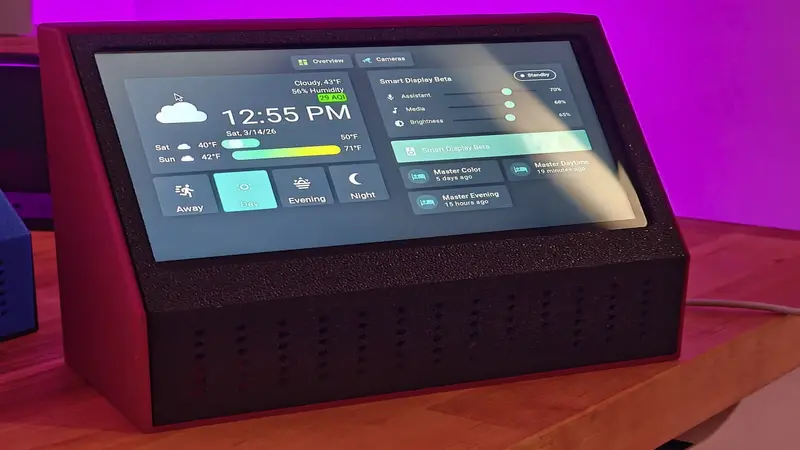
TuneoutDisplay is a sophisticated DIY smart display solution designed for the Raspberry Pi 4B. It transforms a standard Pi, a 7-inch touchscreen, and a ReSpeaker 2-Mic HAT into a fully integrated Home Assistant satellite. Unlike generic tablets, TuneoutDisplay is built from the ground up to handle always-on wake word detection, high-fidelity audio streaming, and deep integration with the Home Assistant ecosystem via MQTT.
Hardware and OS Foundation
The project is optimized for the Raspberry Pi 4B (1GB or 2GB RAM) running the 64-bit version of Raspberry Pi OS (Trixie/Debian 13). For audio input and output, it utilizes the KEYESTUDIO ReSpeaker 2-Mic Pi HAT, which features the WM8960 codec. The visual interface is powered by the official Raspberry Pi 7-inch DSI Touchscreen.
A notable technical choice is the use of the labwc compositor for Wayland. Because standard Wayland environments often struggle with touchscreen-to-scroll mapping in kiosk modes, the project includes a custom touch-scroll.py daemon. This script translates touchscreen swipe gestures into virtual scroll-wheel events, ensuring a smooth user experience when navigating Home Assistant dashboards.
Voice and Audio Architecture
TuneoutDisplay implements a robust voice pipeline using the Linux Voice Assistant (LVA) and OpenWakeWord. By default, it listens for “Hey Jarvis,” though this is configurable. The voice system connects to Home Assistant via the ESPHome integration, allowing the device to function as a native Assist satellite.
The audio architecture is particularly advanced for a DIY project. It uses an ALSA dmix configuration to allow multiple simultaneous audio streams. This enables independent volume control for different channels:
- TTS/Voice Volume: Managed via a
softvolstream for assistant responses. - Media Volume: Managed via a separate
softvolstream for Music Assistant playback.
This separation allows users to lower music volume while keeping the voice assistant audible, or vice versa, directly from Home Assistant sliders.
Home Assistant Integration
Integration is handled primarily through a Python-based MQTT bridge. This bridge utilizes MQTT auto-discovery to register the display as a native device in Home Assistant. Once connected, the device automatically exposes several entities:
- Voice and Media volume sliders.
- Display brightness control.
- Microphone sensitivity (gain) tuning.
- Mute toggles.
For the frontend, the repository provides a custom Lovelace card (smart-display-card.js) that provides a unified control interface for these entities, including status chips that show whether the assistant is listening, responding, or muted.
Media Playback
With the release of Music Assistant 2.7, TuneoutDisplay supports the sendspin native player. This allows the device to appear automatically as a media player in Music Assistant, providing a seamless multi-room audio experience alongside its voice assistant capabilities.
Installation and Configuration
The project is designed to be accessible through a comprehensive configure.sh script. This script automates the installation of dependencies, builds the necessary DKMS drivers for the ReSpeaker HAT, configures the ALSA audio stack, and sets up the systemd services required for the MQTT bridge and touch-scroll daemon. It also handles the kiosk mode setup, ensuring Chromium launches automatically and waits for Home Assistant to be reachable before displaying the UI.