Thermalright LCD Control
A Linux-based desktop application for managing Thermalright LCD displays and RGB LED controllers through a native Qt interface. It uses a reverse-engineered protocol to communicate with hardware via USB, supporting various metrics for CPU, GPU, and system status without requiring a root service.
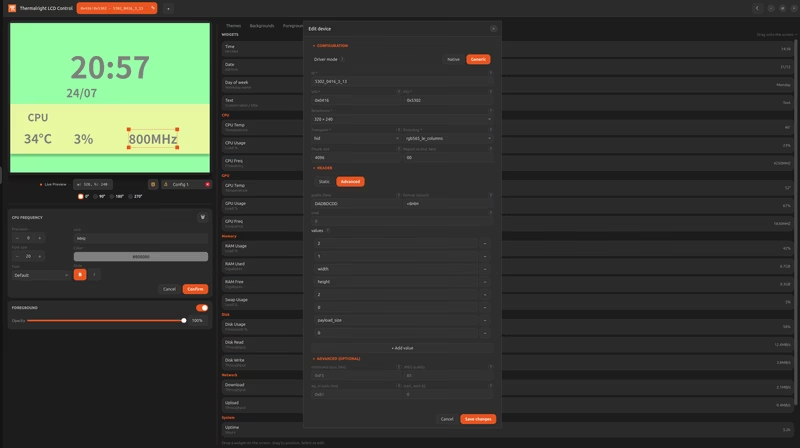
Thermalright LCD Control provides an intuitive graphical interface for managing Thermalright LCD displays on Linux systems. Developed through reverse engineering of the original Windows application, this tool allows users to monitor hardware metrics and customize their cooler displays without relying on proprietary software or background root services.
Overview and Architecture
Since version 2.0, the application has evolved into a single desktop app where the GUI embeds the device controller directly. This architecture eliminates the need for a separate root service; instead, device access is granted through standard udev rules. The application is designed to integrate seamlessly with the Linux desktop, featuring a system tray icon and automatic session startup support.
The development involved extensive analysis of the Thermalright Windows application to decode the internal mechanisms and communication protocols. This research identified four distinct USB VID:PID combinations that share a consistent interaction logic, allowing the application to support a range of hardware beyond the initial test device, the Frozen Warframe 420 BLACK ARGB.
Key Features
The application is built with a modern native Qt interface that supports both light and dark themes. It is capable of driving multiple displays simultaneously, with a per-device tab bar for quick switching and automatic configuration saving.
One of the most powerful aspects is the Automatic Device Detection. Connected displays are detected on the fly via USB, appearing or disappearing in the GUI as they are plugged or unplugged. For users with hardware not yet officially indexed, the application includes a generic, data-driven driver. This allows users to register new devices directly from the GUI by selecting the transport, encoding, and header format without writing any Python code.
Customization and Themes
The software includes a robust theme engine with bundled presets. Users can manage per-resolution backgrounds and foregrounds, with support for various media formats including images, animated GIFs, and videos.
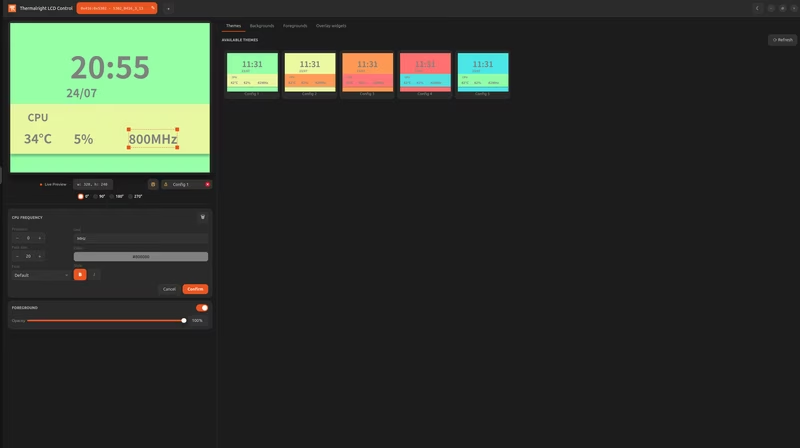
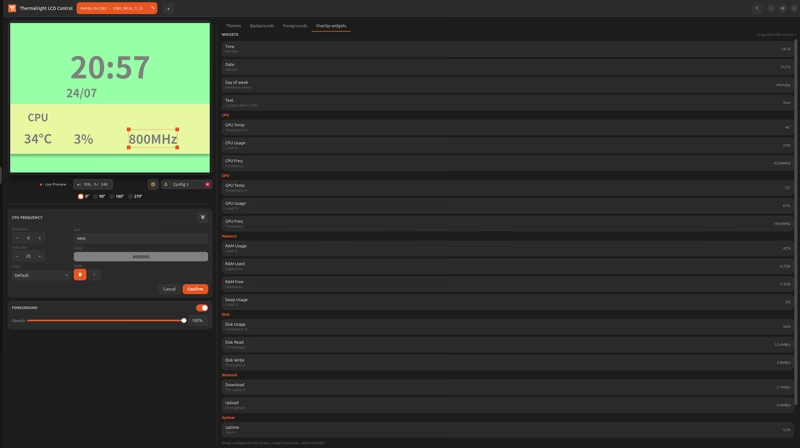
For layout design, a drag-and-drop Widget Editor enables the placement of metrics, clocks, and text. Each widget supports per-element font selection, color, and precision. The display can also be rotated (0°/90°/180°/270°), and the software is rotation-aware, adjusting backgrounds and foregrounds accordingly.
Hardware Support
LCD Displays
The application supports several communication protocols including SCSI BOT, HID, and USB Bulk. Compatible hardware includes:
- Frozen Warframe Series: 420 BLACK ARGB and other SCSI variants.
- Frozen Magic Series: 240/360 HID and SCSI variants.
- Trofeo Vision: Models using LY and LY1 firmware.
- ChiZhu Tech GrandVision: AIO variants with 320x320 or 480x480 screens.
RGB LED Controllers
Beyond LCDs, the application supports the Thermalright digital LED controller (0416:8001). It provides a dedicated control panel for digital LED coolers like the AX120, PA120, and the LF series. Features include:
- Six animation modes (breathing, rainbow, temperature-linked, etc.).
- Per-zone color and brightness control for multi-zone models.
- A live preview that renders the real per-model layout, including digital segment displays for temperature or clock readouts.
Hardware & OS Metrics
The application acts as a comprehensive hardware monitor, capable of displaying widgets for:
- CPU: Temperature, usage, and frequency.
- GPU: Support for AMD, Nvidia, and Intel metrics.
- Memory: RAM and swap usage.
- Disk & Network: Filesystem usage, throughput, and system uptime.
Installation and System Integration
The application is distributed as a self-contained package that bundles its own Python runtime and dependencies, ensuring it does not interfere with the system’s Python environment. It is available via the openSUSE Build Service for Fedora, Debian, and Ubuntu, and also supports atomic distributions like Bazzite and Silverblue through rpm-ostree layering.
To ensure low resource overhead, the application pauses on-screen previews while the main window is hidden in the system tray, while the physical device continues to update in the background. Users must typically add themselves to the plugdev group to allow the application to communicate with the USB hardware without root privileges.
Related Projects
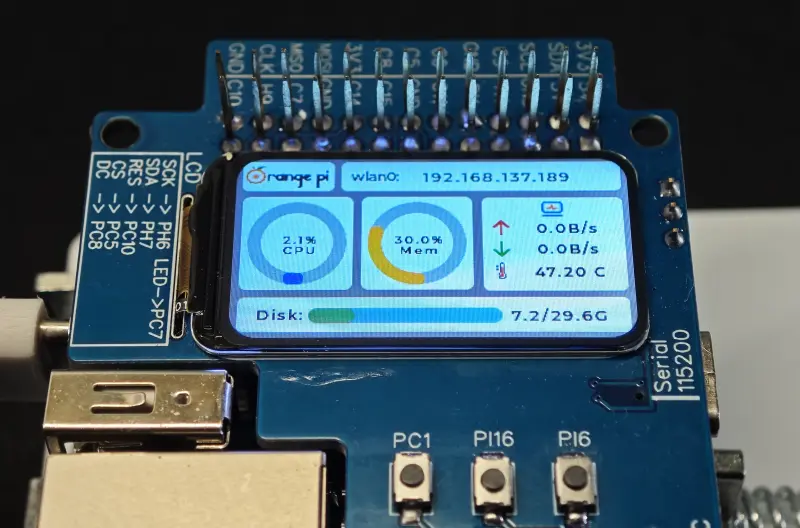
DevMonitor for Pis
A high-performance device monitoring solution for Raspberry Pi and Orange Pi platforms using the LVGL graphics library. It features custom PCB designs and software for ST7789-based LCD screens to display real-time system metrics and hardware status.