Riden Dongle
An alternative firmware for Riden WiFi modules that provides Modbus TCP and SCPI support for RD-series power supplies. Built using the Arduino framework for ESP8266, it enables integration with professional lab automation tools and provides a comprehensive web interface for remote monitoring and control.
Riden Dongle is an alternative firmware designed for the Riden WiFi module, transforming it into a versatile communication bridge for RD-series power supplies. It moves beyond the limitations of the original mobile app, offering Modbus TCP and SCPI support to allow for seamless integration with standard laboratory automation tools and a custom web interface.
The firmware is compatible with a wide range of Riden power supplies, including the RD6006, RD6012, RD6018, RD6024, RD6030, RD6006P, and RD6012P. It has been verified against various software environments such as pyModbusTCP, lxi-tools, EEZ Studio, and PyVISA.
Core Features
The firmware functions as a Modbus RTU client that communicates directly with the power supply’s internal firmware while acting as a Modbus TCP bridge for external network clients. It provides SCPI control through two primary methods: raw sockets (port 5025) and VXI-11, which allows for instrument discovery via mDNS.
Beyond protocol bridging, the dongle includes a built-in web interface for configuration, firmware updates, and remote control. It also features automatic time synchronization for the power supply clock via NTP and handles approximately 65 queries per second when paired with high-speed UART settings and UniSoft custom firmware.
Communication and Protocols
For automation, the VXI-11 channel is highly recommended as it is auto-discoverable and handles commands synchronously. Alternatively, raw sockets can be used for direct communication, though they require specific read/write termination characters (\n) and careful timing to avoid network queuing delays.
Hardware Preparation and Adaptation
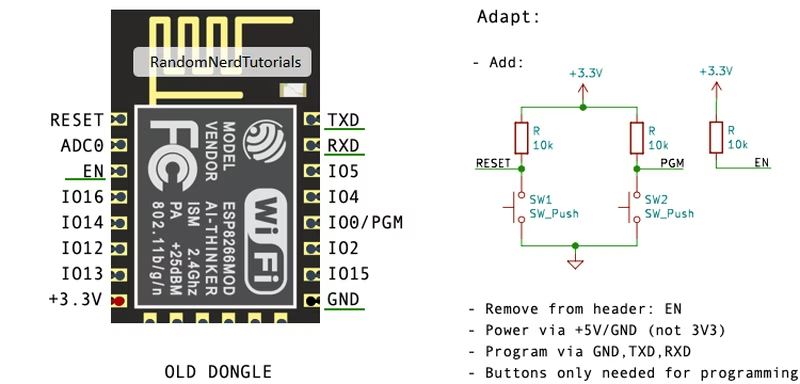
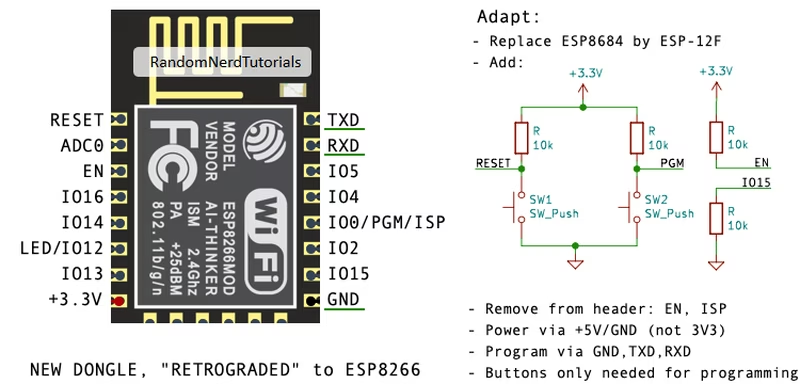
Implementing this firmware requires specific hardware modifications to the Riden WiFi module. Users must ensure they are using an ESP-12F module. While older dongles came with this chip, newer versions often use the ESP8684, which is currently unsupported due to encrypted firmware. In these cases, the ESP8684 must be physically removed and replaced with an ESP-12F.
Adaptation for ESP-12F Dongles
Preparation involves soldering 10k resistors to pull the EN pin high and managing the GPIO0 (PGM) pin for flashing. It is also necessary to remove the EN pin from the header to prevent interference with the power supply’s default behavior.
Retrofitting Newer Modules
For the newer ESP8684-based boards, a full module swap is required. This process involves careful soldering to align the ESP-12F pins with the existing board footprint.
Firmware Installation and Initial Setup
The firmware is compiled using PlatformIO. Once the hardware is prepared, the module can be flashed via a serial link using pio run -t upload or standard ESP flashing tools. Before re-inserting the module into the power supply, the PSU itself must be configured for TTL interface mode and a matching baud rate (typically 9600 for standard firmware).
Upon the first startup, the dongle acts as a WiFi access point. Users connect to this AP to provide their local network credentials through a captive portal powered by WiFiManager. Once connected, the device becomes accessible via its local IP or mDNS address (e.g., http://RDxxxx-ssssssss.local).
The Web Interface and Remote Control
The web interface is divided into several functional areas:
- Home & Details: Displays general PSU status, remote connectivity info, and deep technical data like calibration and presets.
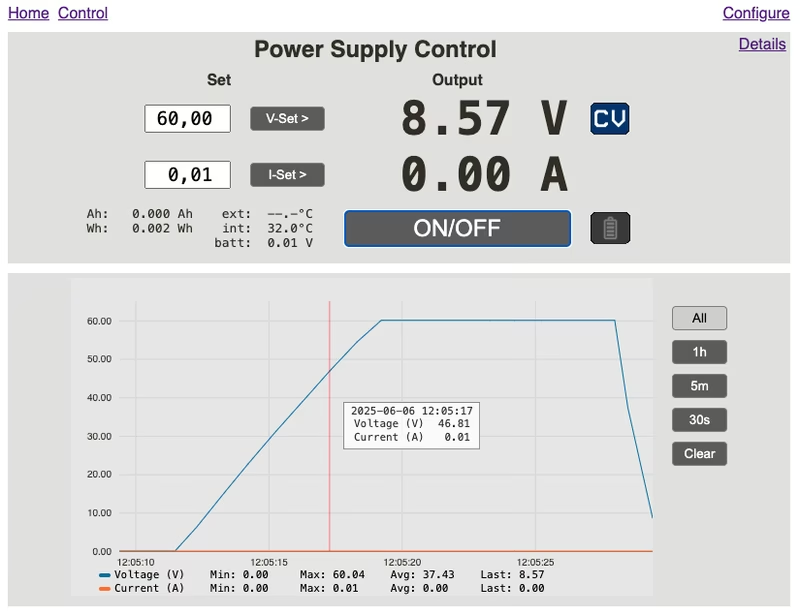
- Control: Offers real-time manipulation of voltage and current settings, output toggling, and live graphing of output values.
- Configure: Manages time settings, baud rates, and supports Over-the-Air (OTA) firmware updates for the dongle.
Technical Limitations
Users should be aware of certain quirks inherent to the Riden power supply firmware. For instance, retrieving currently active OVP and OCP values can be unreliable if changed via presets, leading to the decision not to support the *SAV SCPI command. Additionally, the keypad is automatically locked during active remote control sessions to prevent conflicts, and certain registers, like the buzzer state, may behave inconsistently depending on the specific version of the PSU’s internal firmware.
Related Projects
ESP32 Bus Expander
ESP32 Bus Expander is a companion firmware for the ESP32 Bus Pirate that adds 5 GHz Wi-Fi and 802.15.4 radio support. Running on an ESP32-C5, it acts as a radio coprocessor connected via UART to provide advanced wireless capabilities not available on standard ESP32-S3 boards. The project leverages the Arduino framework and is designed to be easily flashable via a web-based interface.
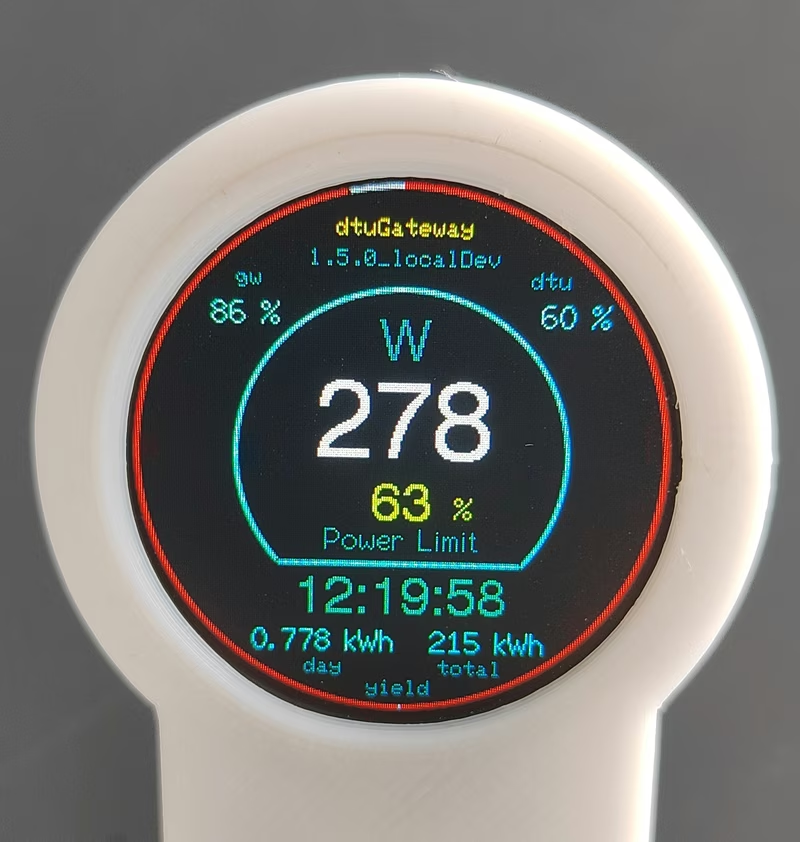
dtuGateway for Hoymiles HMS Inverters
dtuGateway is an ESP32-based firmware that bridges Hoymiles HMS-series solar inverters with integrated Wi-Fi to smart home ecosystems. It provides reliable data monitoring and remote control via MQTT, REST API, and openHAB, bypassing the limitations of the official cloud interface. The project supports various local displays and features a captive portal for easy configuration.