Renode RP2040 Simulation
A comprehensive simulation framework for the Raspberry Pi RP2040 microcontroller based on Renode. It features a specialized C++ PIO simulator, support for core peripherals like DMA and I2C, and a Python-based visualization tool for virtual hardware debugging.
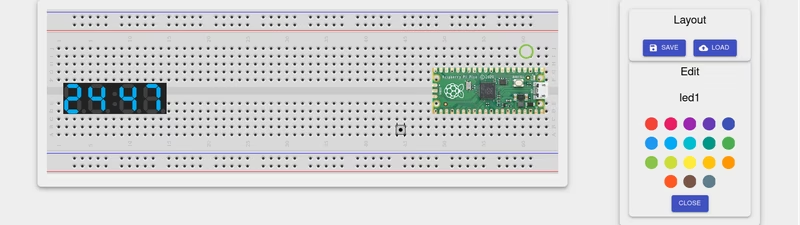
Developing for the Raspberry Pi RP2040 often involves a repetitive cycle of flashing and testing on physical hardware. This project provides a powerful alternative by implementing a detailed simulation of the RP2040 microcontroller within the Renode framework. It offers a structured way to build board-level simulations, allowing developers to run and debug firmware in a virtual environment that mimics the behavior of the Raspberry Pi Pico and custom RP2040-based designs.
Comprehensive Peripheral Support
The simulation covers a wide range of the RP2040’s unique architecture. Key peripherals such as the Single-cycle IO (SIO), which handles multicore synchronization and hardware dividers, are partially supported to enable dual-core firmware execution. The DMA controller is implemented with support for ringing and control blocks, which is essential for high-performance data transfer scenarios often found in RP2040 projects.
Other supported hardware includes:
- GPIO: Full pin manipulation with interrupt support.
- Communication Interfaces: UART (reimplemented PL011), SPI (master mode), and I2C (master mode with DMA support).
- Timing & Control: Watchdog timers, Alarms, and basic Clock tree propagation.
- Memory & Boot: XIP (Execute In Place) support is partially implemented, allowing the virtual Bootrom to correctly start user firmware.
High-Performance PIO Simulation
One of the most innovative aspects of this repository is the handling of the Programmable I/O (PIO) blocks. Because the PIO is a high-speed, timing-critical component, a standard C# implementation within Renode would have faced significant performance bottlenecks. To solve this, the project utilizes an external simulator written in C++ called piosim.
This C++ component acts as a bridge, functioning as an additional CPU within the Renode environment. Because Renode executes instructions in batches (quantums) for speed, this implementation includes manual synchronization mechanisms to ensure that interactions between the PIO and other peripherals, like the SPI bus, remain accurate. For developers on Windows, this requires a MinGW/MSYS environment to compile the piosim.dll, similar to the workflow used for Verilator co-simulation.
Visualization and Debugging
Beyond just running code, the project includes a Python-based visualization plugin. This allows developers to see their virtual board in a web browser, complete with interactive elements. Users can add buttons or LEDs to the layout, and the plugin even supports 7-segment displays. The layouts can be saved and loaded via JSON files, providing a visual feedback loop that is often missing in pure CLI-based simulators.
For complex scenarios, the framework supports multi-node simulation. This means multiple RP2040 instances can be networked together using GPIOConnector, enabling the simulation of distributed systems or complex master-slave hardware configurations.
Accuracy and Testing
Simulation accuracy is a priority, and the project provides tools to tune the trade-off between speed and precision. By adjusting the GlobalQuantum, developers can increase the granularity of the simulation to resolve race conditions or timing issues in PIO and ADC code.
The project is rigorously tested against the official pico-examples suite. The README provides a detailed status matrix showing which examples (such as ADC console, DMA channel IRQs, and Multicore runners) are currently passing, giving users a clear picture of the simulator’s maturity across different hardware subsystems.
Getting Started
Using the simulation is straightforward for those familiar with the Renode monitor. A typical session involves adding the repository path and including the Pico board description:
(monitor) path add @repos/Renode_RP2040
(monitor) include @boards/initialize_raspberry_pico.resc
(raspberry_pico) sysbus LoadELF @my_firmware.elf
(raspberry_pico) showAnalyzer sysbus.uart0
(raspberry_pico) start
For custom hardware, the framework allows users to extend the base Raspberry Pico configuration with their own .repl files, making it a versatile tool for both hobbyist Pico projects and professional RP2040 product development.