pigg: Raspberry Pi and Pi Pico GPIO Remote Control
A comprehensive suite of applications for remote GPIO control and visualization on Raspberry Pi and Pi Pico hardware. It features a cross-platform GUI for real-time monitoring and configuration, a headless CLI agent for remote execution, and specialized embedded firmware for Pi Pico microcontrollers.
Overview
pigg is a versatile toolset designed to bridge the gap between desktop environments and physical GPIO (General Purpose Input/Output) hardware. Whether you are working directly on a Raspberry Pi or remotely from macOS, Windows, or Linux, pigg provides a unified interface to configure pins, monitor input levels, and control outputs. The project is particularly useful for developers and hobbyists who need to interact with hardware without being physically tethered to the device or for those who require a sophisticated visual representation of pin states.
The Three Pillars of pigg
The project is divided into three primary components, each serving a specific role in the ecosystem:
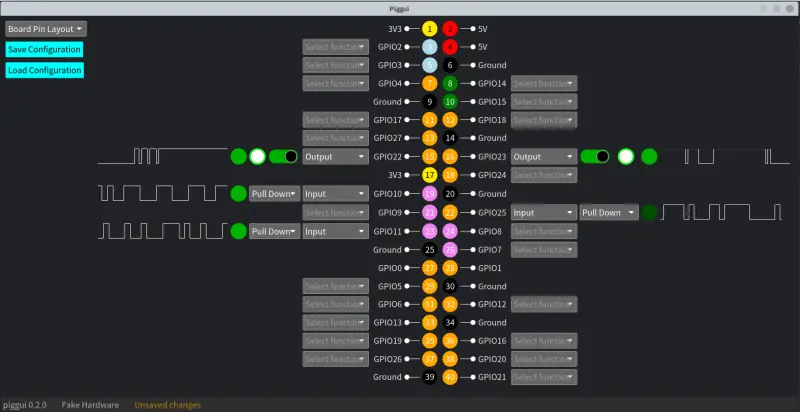
- piggui: A cross-platform Graphical User Interface that allows users to visualize GPIO pins in real-time. It supports two distinct layouts: a “Board Pin Layout” that mimics the physical header of the Pi and a “BCM Pin Layout” ordered by BCM pin numbers. It provides waveform views for history tracking and interactive controls for toggling outputs.
- pigglet: A headless command-line utility designed to run on the target hardware (like a Raspberry Pi). It acts as an agent that listens for configuration changes from a remote
pigguiinstance and reports hardware events back to the interface. - porky: A specialized embedded application developed for the Raspberry Pi Pico and Pi Pico W. It enables remote interaction with the Pico’s GPIO hardware over USB or TCP (for the W model), allowing the microcontroller to be controlled as a remote peripheral.
Remote Connectivity and Discovery
One of the standout features of pigg is its robust networking capability. It utilizes mDNS for automatic discovery of networked devices and supports Iroh-net for secure remote connections. By using an endpoint_id, users can connect to a Raspberry Pi located anywhere on a network without complex manual configuration.
Events are timestamped at the source—as close to the hardware as possible—ensuring that network latency does not distort the accuracy of the waveforms displayed in the GUI. This makes it a reliable tool for debugging timing-sensitive GPIO interactions remotely.
Advanced Visualization and Control
pigg goes beyond simple high/low toggling. Each pin in the GUI features a drop-down selector to configure its function (Input, Input with pull-up/pull-down, or Output).
- Inputs: Visualized with LED-style indicators (Red for off, Green for on) and a waveform view showing the recent history of detected levels.
- Outputs: Feature toggle switches for stable values and a “clicker” for quick inversions, also accompanied by a waveform view to track the set levels over time.
Hardware and Platform Support
The project offers extensive support across various architectures and operating systems. The GUI can run on Apple Silicon, x86_64 (Linux/Windows/macOS), and ARM-based Raspberry Pis (including Pi 4, 5, and Zero series). The embedded porky component targets the RP2040 and RP2350 (Pi Pico 2) platforms, providing UF2 images for easy deployment.
For Linux users, the project includes specific udev rules to manage USB permissions, ensuring seamless interaction with USB-connected Pico devices. The entire suite is built using Rust, leveraging the language’s safety and performance characteristics for both desktop applications and embedded firmware.