PicoGamepadConverter
A versatile controller protocol converter for RP2040 and RP2350 microcontrollers that bridges USB, Bluetooth, and retro gaming peripherals. It supports a wide array of input and output modes including Xinput, Nintendo Switch, and legacy console signals for PlayStation and Gamecube.
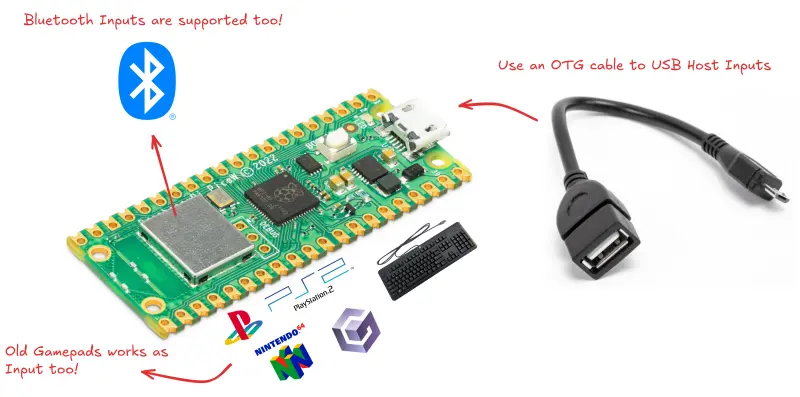
PicoGamepadConverter is a powerful firmware solution for the Raspberry Pi Pico and other RP2040/RP2350-based boards, designed to bridge the gap between various gaming peripherals and platforms. Whether you are looking to use a modern Bluetooth controller on a vintage PlayStation 2 or connect a classic Nintendo 64 controller to a PC as an Xinput device, this project provides the necessary translation layer.
The project stands out for its flexibility, supporting both USB and wireless inputs while offering a variety of output protocols. It leverages the unique hardware capabilities of the RP2040, such as Programmable I/O (PIO), to handle timing-sensitive protocols like those used by Gamecube, N64, and PS1/PS2 controllers.
Versatile Input and Output Modes
The system operates on a “Host” and “Device” architecture. The Host represents the input controller, while the Device represents the target system or console.
Host Modes (Inputs)
- USB: Supports Xinput (Xbox) and Dinput (PS3/PS4/8BitDo) controllers via the native USB port or PIO-based secondary ports.
- Wireless: Bluetooth support for PS4, 8BitDo, and generic HID gamepads (requires Pico W hardware).
- Retro/Special: Native support for PS1/PS2 controllers, N64 controllers, and even legacy PS/2 keyboards.
Device Modes (Outputs)
- USB: PC-compatible Xinput, generic HID Dinput, and Nintendo Switch Pro Controller emulation.
- Wireless: Bluetooth HID and Wiimote emulation, including support for Nunchuk and Classic Controller attachments.
- Legacy Consoles: Direct emulation of Gamecube and PlayStation 1/2 controller signals via GPIO pins.
Web-Based Configuration
One of the most user-friendly features of PicoGamepadConverter is its integrated web interface. By holding the BOOSTEL button during power-on, the device enters a configuration mode. Users can connect to a local web server (typically at http://192.168.3.1) to select their desired host and device modes, configure analog deadzones, swap D-pad and analog stick functions, or enable specialized features like “Block Analogs.” This eliminates the need for complex command-line tools or re-flashing firmware just to change a setting.
Technical Foundation
The project is built upon several high-quality open-source components. It uses the pico-sdk for core hardware interaction and TinyUSB for standard USB stack management. To overcome the single USB port limitation of the Raspberry Pi Pico, it integrates Pico-PIO-USB, which uses the PIO state machines to bit-bang an additional USB host or device port.
For wireless connectivity, the project utilizes btstack, a dual-mode Bluetooth stack that enables the Pico W to act as both a Bluetooth host for controllers and a Bluetooth device for consoles. The web interface is powered by the Mongoose networking library, providing a robust HTTP server over an RNDIS (Ethernet over USB) connection, which typically utilizes the lwip stack for TCP/IP management on the RP2040 platform.
Hardware Integration
The project makes extensive use of the Pico’s GPIO pins for retro console connectivity. For example, PS1/PS2 host mode utilizes pins 19 through 22 for Command, Clock, Attention, and Data signals. Gamecube and N64 modes utilize single-wire bidirectional communication on pin 19. The project documentation provides detailed pinout diagrams and schematics to help users build their own adapters using simple breadboards or custom PCBs.
Community and Acknowledgments
PicoGamepadConverter draws inspiration and code from several prominent projects in the fighting game and retro-modding communities, including GP2040-CE and various specialized PIO implementations for Joybus and PSX SPI protocols. This collaborative foundation ensures high compatibility and performance across a wide range of tested controllers, from the Logitech F710 to the DualShock 4 and original Nintendo 64 peripherals.