Modbux
Modbux is a cross-platform Modbus client and server simulation tool built with Electron and React. It supports both Modbus TCP and RTU protocols, offering advanced data type interpretation, register scanning, and simultaneous client-server operation for industrial automation testing.
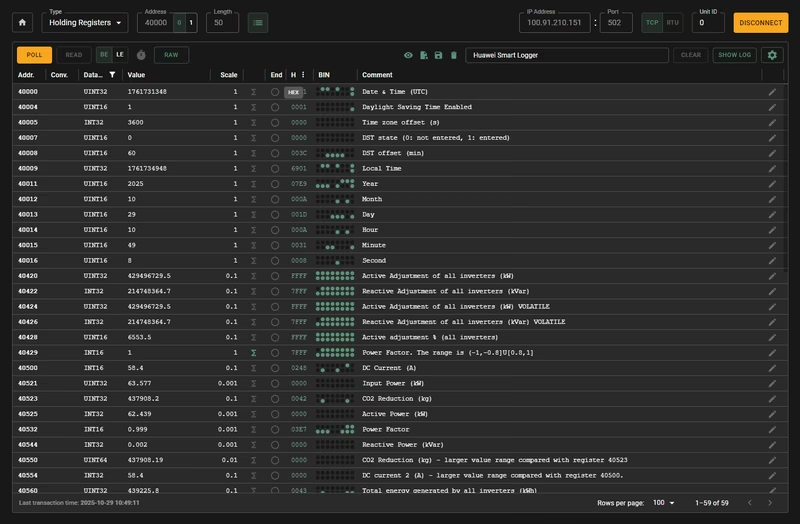
Modbus is one of the most ubiquitous protocols in industrial automation, yet it remains a frequent source of frustration during commissioning and development. Misaligned register offsets, endianness confusion, and documentation discrepancies often lead to hours of troubleshooting. Modbux was developed to solve these specific pain points, providing a modern, high-level interface for interacting with Modbus devices.
At its core, Modbux serves as both a diagnostic client and a versatile server simulator. It bridges the gap between raw hex values and meaningful engineering data by supporting 12 different data types, including various integer widths, floating-point numbers, bitmaps, and UTF-8 strings. This allows users to see multiple interpretations of a register simultaneously, which is invaluable when documentation is unclear about whether a value should be read as a signed 16-bit integer or a specific bitmask.
Comprehensive Client Capabilities
The client mode is designed for real-world field use. It handles the nuances of Modbus TCP and RTU communication, including automatic COM port discovery for serial connections. One of its standout features is the Read configuration mode, which optimizes communication by grouping registers into efficient read requests. This reduces bus load and improves update rates when monitoring large sets of data.
For complex registers like status words, the bitmap detail panel provides an expandable 16-bit view. This panel includes per-bit toggles, color coding, and inline comments, making it easy to decode device states without constantly referring to a manual. Users can also apply scaling factors and linear interpolation to raw register values, converting them directly into human-readable units like temperature or pressure.
Simulation and Server Mode
Testing software against physical hardware is not always feasible during the development phase. Modbux includes a robust server mode that can simulate up to 10 Modbus devices in TCP mode and supports full RTU server functionality via serial ports or virtual pairs. The server allows for the generation of static or random values, as well as time-based generators that output current system time in formats like Unix timestamps or IEC 870-5 datetime.
This simulation capability is enhanced by the Split Mode, which runs the client and server in separate windows. This setup allows developers to connect to a local server at 127.0.0.1, facilitating hands-on learning or the simultaneous development of both sides of a communication link. This environment is perfect for verifying PLC logic or SCADA configurations before deploying to a live site.
Hardware Integration: Arduino Emulation
Beyond the desktop application, the project includes utility tools for hardware-level emulation. A provided Arduino sketch demonstrates how to turn an Arduino Uno into a Modbus RTU emulator. Specifically, it mimics the data output of a Schneider iEM3000 series power meter. By using the ArduinoModbus library, the sketch calculates and serves simulated electrical measurements—such as voltage, current, and power—via holding registers. This allows users to test their Modbux configurations against actual serial hardware without needing an expensive industrial meter.
Built for Modern Workflows
Modbux is built using Electron, React, and Material-UI, ensuring a responsive and persistent user experience. All configurations, connection settings, and register mappings are automatically saved between sessions. For developers looking to automate their setup, the tool uses JSON for configuration files. This makes it possible to use external scripts or AI tools to map device documentation directly into a Modbux-compatible format, significantly speeding up the setup process for complex devices.