LiquidCrystal_I2C_Multilingual
An Arduino library for displaying UTF-8 encoded multilingual strings and custom symbols on I2C character LCDs like the LCD1602 and LCD2004. It supports a variety of hardware including ESP8266 and ESP32, providing specialized classes to handle different LCD ROM character sets and custom CGRAM generation for languages like Vietnamese.
LiquidCrystal_I2C_Multilingual is an advanced Arduino library designed to solve the challenge of printing multilingual UTF-8 strings on standard character LCDs. Whether you are working with Katakana, Russian, French, Spanish, or Vietnamese, this library provides the necessary mapping to render characters correctly on LCD1602, LCD2004, and similar modules connected via I2C using the PCF8574 expander. It is an evolution of the LiquidCrystal_I2C_UTF8 library, expanding language support and improving performance for concurrent multi-LCD setups.
Hardware Compatibility
The library is compatible with a wide range of MCU development boards, including the Arduino Uno, Nano, and Micro, as well as more powerful modules like the ESP8266, ESP32, and WeMos LOLIN D1 Mini. It targets LCD modules using popular controllers such as the Hitachi HD44780U, Wuxi AIP31066, Samsung KS0066, and Sitronix ST7066. To function correctly, the LCD module must generally have the appropriate language font built into its ROM, though the library can generate customized fonts in CGRAM for specific languages like Vietnamese.
I2C Wiring and Configuration
Connecting the hardware is straightforward, following standard I2C protocols. The I2C adapter’s GND and VCC pins connect to the MCU’s GND and VIN, while the SCL and SDA pins connect to the board’s specific I2C pins (e.g., A5/A4 on an Uno, or D22/D21 on an ESP32).
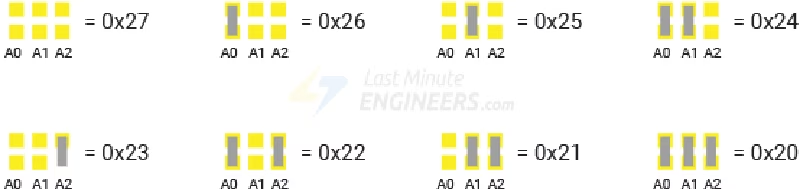
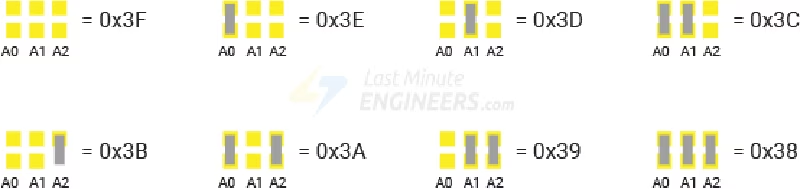
Finding the correct I2C address is a critical step. Most PCF8574 adapters using Texas Instruments chips default to address 0x27, while those using NXP chips typically use 0x3F. The specific address can be determined by checking the A0, A1, and A2 pins on the adapter or by running an I2C scanning program.
Implementation and Usage
The library is highly flexible, offering specialized classes based on the LCD’s hardware ROM and the specific character requirements of your project. For simple European language support on a Latin ROM, you might use LCDI2C_Latin, while projects requiring Cyrillic characters on a Russian ROM would utilize LCDI2C_Russian.
One of the library’s standout features is its ability to handle long strings and word wrapping automatically. If a word cannot fit on the current line, it is moved to the next. For very long strings, the print(text, nsec) function allows the display to pause for a specified number of seconds before clearing the screen to show the next segment of text.
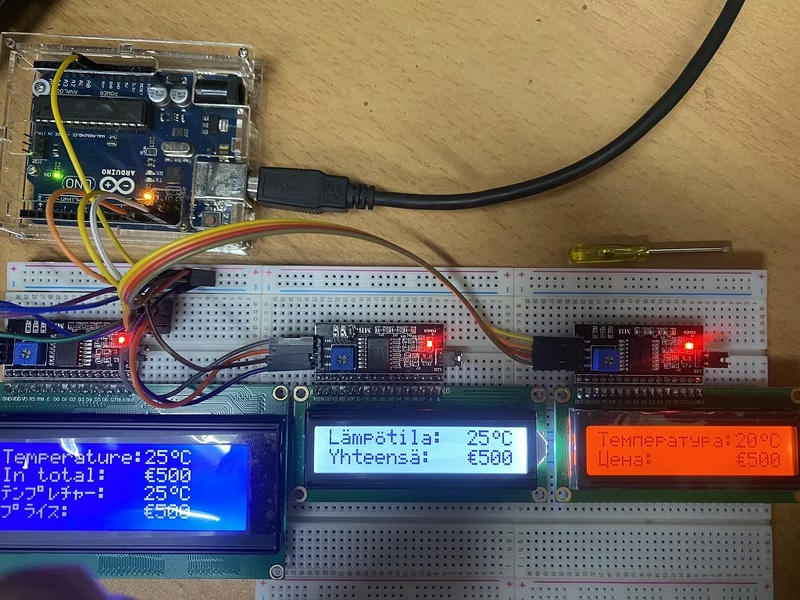
For more complex scenarios, the library supports dual and triple LCD configurations, allowing for simultaneous display of different languages across multiple screens.
Choosing the Right Class
The library categorizes its functionality into three main implementation cases:
- ROM-only: Uses the characters already built into the LCD chip. Classes include
LCDI2C_Generic,LCDI2C_Katakana, andLCDI2C_Russian. - ROM + Customized Symbols: Adds support for symbols like the degree sign (° ) or Euro (€) by creating them in the LCD’s CGRAM. Classes follow the naming convention
LCDI2C_[Language]_Symbols. - ROM + Customized Languages: Specifically designed for languages like Vietnamese that are not found in standard ROMs. This uses CGRAM to generate diacritics dynamically. Due to CGRAM limits, a maximum of 8 different Vietnamese letters with diacritics can be displayed on a single screen at once.
While the library is robust, it currently does not support autoscroll, __FlashStringHelper, or Hebrew ROMs. For the best compatibility, users are encouraged to ensure their Unicode strings are normalized in NFC format before printing.