FPBInject
FPBInject is a runtime code injection tool for ARM Cortex-M microcontrollers that allows developers to replace functions on a running device without reflashing, rebooting, or using a debugger. It leverages the hardware Flash Patch and Breakpoint (FPB) unit to redirect execution to custom code in RAM, supporting both bare-metal and NuttX environments on STM32F103 hardware.
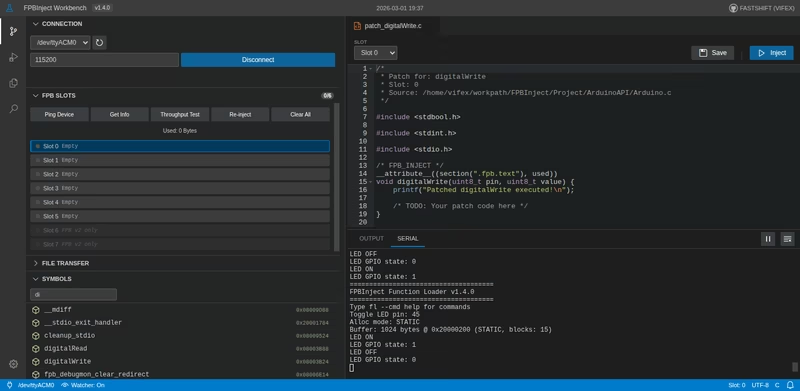
FPBInject provides a revolutionary approach to firmware development for ARM Cortex-M microcontrollers by enabling runtime code injection. This tool allows developers to replace any function on a running MCU through a simple serial connection, eliminating the need for constant reflashing, external debuggers, or system downtime.
Traditional Development vs. FPBInject
In a traditional embedded development cycle, even a minor code change requires a time-consuming sequence: compiling, erasing flash, writing the new binary, rebooting the MCU, and finally attempting to reproduce the issue. This cycle often takes 30 seconds or more. FPBInject streamlines this process significantly. By compiling and injecting patches directly into RAM, the MCU never stops running, and updates are live in under a second. This “no pit stop” workflow allows for rapid iteration and real-time debugging of complex issues.
How It Works
At the heart of the system is the Flash Patch and Breakpoint (FPB) hardware unit found in ARM Cortex-M processors. When a target function is called, the FPB unit intercepts the address match. It then redirects the execution flow through a trampoline located in Flash, which jumps to the replacement function residing in RAM. Because this redirection is handled entirely by hardware, there is zero software overhead on the call path, and the original Flash memory remains completely untouched.
Integrated Workbench
FPBInject includes a browser-based workbench that serves as a comprehensive interface for the injection workflow. From this interface, developers can browse the firmware’s symbol table and view disassembly or decompiled source code for any function.
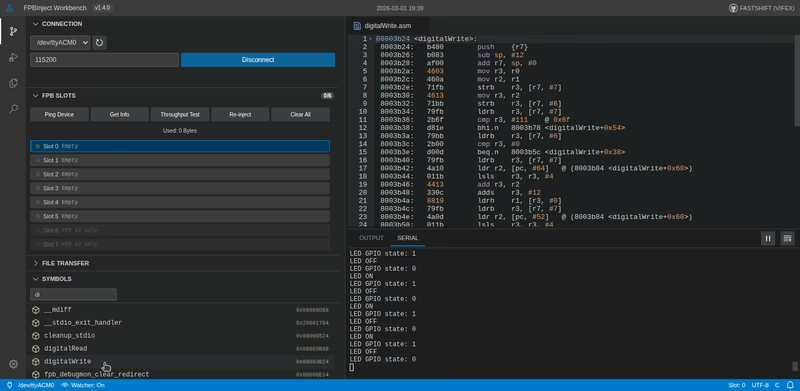
Manual and Auto Injection
The workbench supports two primary modes of operation. In Manual Inject mode, you can write a replacement function in C directly within the interface; hitting inject triggers a background compilation and upload process that typically completes in less than a second.
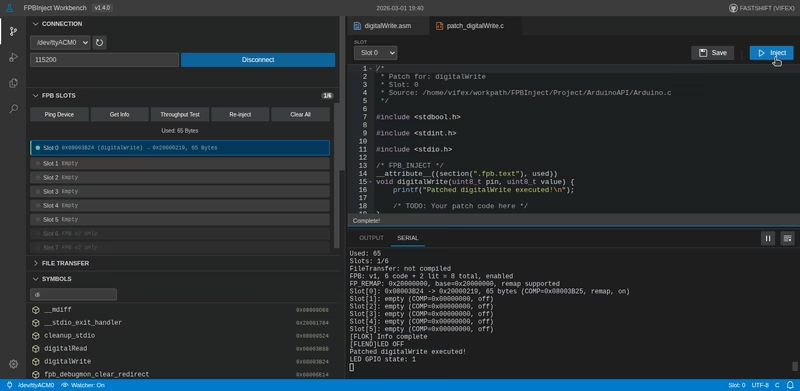
For an even tighter feedback loop, Auto Inject monitors a source directory for changes. By adding a specific /* FPB_INJECT */ marker to a function, the workbench will automatically detect file saves, recompile the specific function, and re-inject it into the running hardware without manual intervention.
File Transfer Capabilities
Beyond code injection, the system supports robust file transfer over serial. This allows developers to browse, upload, and download files on the device’s filesystem. The interface supports drag-and-drop operations for files and folders, includes CRC verification for data integrity, and provides progress tracking. It is designed to work with various filesystem backends, including POSIX (NuttX VFS, Linux), FatFS, and standard C libraries.

Writing Patches
Creating a patch involves writing standard C code with a dedicated marker. The function signature must match the original function exactly to ensure compatibility.
#include <Arduino.h>

/* FPB_INJECT */
__attribute__((section(".fpb.text"), used))
void digitalWrite(uint8_t pin, uint8_t value) {
    printf("Patched: pin=%d val=%d\n", pin, value);
    value ? digitalWrite_HIGH(pin) : digitalWrite_LOW(pin);
}
If you need to call the original function from within your patch, you must use a function pointer that points directly to the original address while temporarily disabling the FPB redirect to avoid infinite recursion. The workbench is capable of generating these wrappers automatically when the original address is known.
Hardware & Architecture Support
FPBInject is compatible with ARMv7-M and ARMv8-M architectures and has been extensively tested on the STM32F103C8T6. Depending on the FPB version of the hardware, it supports between 6 and 8 patch slots. It offers multiple patch modes, including Trampoline/Direct for ARMv7-M and DebugMonitor for ARMv8-M. The system is designed to work seamlessly with both bare-metal firmware and the NuttX RTOS.