ESP8266 OLED HW-364A/B Development Guide
A comprehensive configuration guide and code repository for the HW-364A and HW-364B ESP8266 modules featuring integrated 0.96-inch OLED displays. It provides corrected I2C pin mappings, implementation examples using the U8g2 library, and specific Arduino IDE configuration settings to ensure reliable operation.
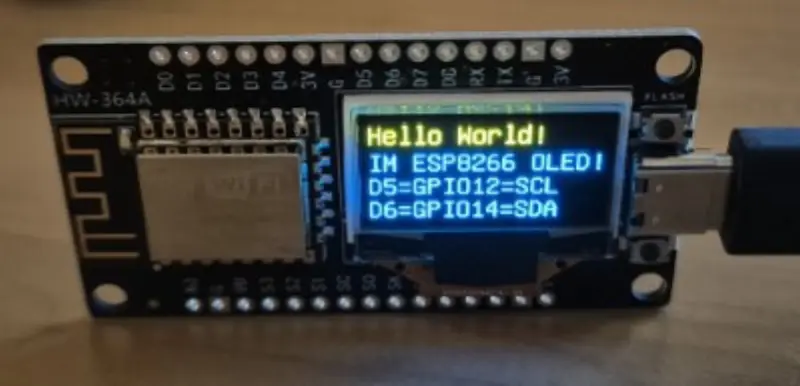
The HW-364A and HW-364B development boards are highly integrated platforms that simplify the creation of IoT devices with visual feedback. By pairing the ubiquitous ESP8266 microcontroller with a sharp 0.96-inch SSD1306 OLED display, these modules offer a compact solution for projects ranging from environment monitors to network status displays. While these boards are widely available and cost-effective, they are notorious for having inconsistent or incorrect technical documentation from various vendors, which often leads to confusion regarding pin assignments and I2C addresses.
This project serves as a definitive reference for developers looking to get these modules up and running quickly. It identifies the two primary hardware variants: the HW-364A, which features a modern USB-C connector, and the HW-364B, which utilizes the older Micro USB standard. Beyond the connector difference, the core functionality remains consistent across both versions.
Hardware Configuration and Pin Mapping
One of the most common pitfalls with the HW-364 series is the I2C wiring. Many online data sheets provide incorrect GPIO mappings, which results in the display failing to initialize. The correct configuration for these boards is as follows:
- SDA (Data): GPIO 14 (mapped to D6 on the board)
- SCL (Clock): GPIO 12 (mapped to D5 on the board)
- I2C Address: 0x3C
Developers should be particularly aware that some batches of these boards may have the SDA and SCL lines swapped in the PCB trace, necessitating a quick check if the standard configuration does not work immediately.
Implementation with Adafruit_SSD1306
For those who prefer the widely supported Adafruit ecosystem, the project provides a straightforward implementation using the Adafruit_SSD1306 library. This approach is ideal for rapid prototyping and simple text or graphic output. The key to success here is explicitly defining the SDA and SCL pins when beginning the Wire transmission.
#include <Adafruit_SSD1306.h>

#define SCREEN_WIDTH 128
#define SCREEN_HEIGHT 64

#define OLED_RESET     -1
#define SCREEN_ADDRESS 0x3C
#define OLED_SDA 14         // D6
#define OLED_SCL 12         // D5

Adafruit_SSD1306 *display;

void setup() {
  display = new Adafruit_SSD1306(SCREEN_WIDTH, SCREEN_HEIGHT, &Wire, OLED_RESET);
  Wire.begin(OLED_SDA, OLED_SCL);
  display->begin(SSD1306_SWITCHCAPVCC, SCREEN_ADDRESS);
}
Advanced Graphics with U8g2
For more complex visual requirements, the repository includes examples for the U8g2 library. This library is renowned in the embedded community for its extensive font support and memory-efficient rendering. The implementation uses the hardware I2C constructor, ensuring smooth performance on the ESP8266’s limited resources.
#include <U8g2lib.h>
#define OLED_RESET     U8X8_PIN_NONE
#define OLED_SDA 14
#define OLED_SCL 12

U8G2_SSD1306_128X64_NONAME_F_HW_I2C u8g2(U8G2_R0, OLED_RESET, OLED_SCL, OLED_SDA);

void setup() {
  u8g2.begin();
}

void handle_oled(int c) {
  u8g2.clearBuffer();
  u8g2.setFont(u8g2_font_ncenB08_tr);
  u8g2.drawStr(0, 10, "Display is working!");
  // ... rendering logic
  u8g2.sendBuffer();
}
Arduino IDE Setup
To ensure successful flashing and operation, the Arduino IDE must be configured to match the specific constraints of the onboard ESP8266 module. The recommended settings include selecting the Generic ESP8266 Module with an upload speed of 115200. Crucially, the Flash Size should be set to 1MB (FS:64KB OTA:~470KB) to prevent memory allocation errors during the boot process. When updating code, it is recommended to set the ‘Erase Flash’ option to ‘Only Sketch’ to preserve any essential persistent data.