DIY Portrait-Mode Gamepad
A custom RP2040-powered hardware project designed for vertical mobile gaming. It utilizes the GP2040-CE firmware to provide a low-latency USB HID controller experience via a direct USB-C connection, featuring a 3D-printable enclosure and custom PCB.
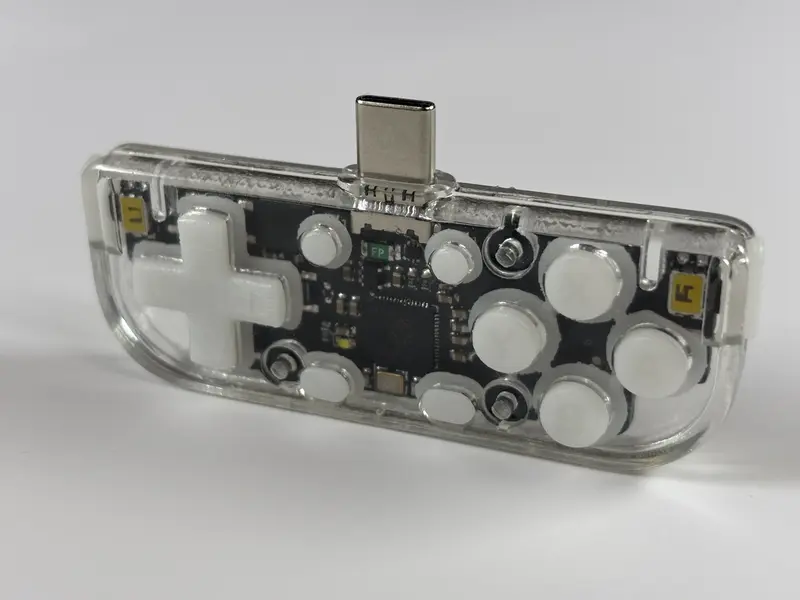
The DIY Portrait-Mode Gamepad is a specialized hardware project designed to enhance the mobile gaming experience, particularly for titles and emulators that favor a vertical orientation. Built around the versatile Raspberry Pi RP2040 microcontroller, this gamepad provides a physical interface for smartphones, connecting directly via a USB-C port to eliminate the latency and battery concerns associated with traditional Bluetooth controllers.
Hardware and Design
The project is centered on a custom PCB and a fully 3D-printable enclosure. By leveraging the RP2040, the gamepad benefits from a powerful yet affordable dual-core processor capable of handling high-speed input tasks. The physical layout is specifically tailored for portrait-mode gaming, which is often neglected by mainstream controller manufacturers. However, the inclusion of side buttons ensures that the device remains functional for traditional landscape-mode gaming as well.
Key hardware features include:
- RP2040 Microcontroller: Provides the core processing power and native USB capabilities.
- USB-C Connectivity: Plugs directly into the phone, drawing power from the mobile device and acting as a standard HID controller.
- 3D-Printable Components: All parts of the case and buttons are designed to be manufactured at home using standard 3D printing equipment.
- Custom PCB: A dedicated circuit board design ensures a compact form factor that fits comfortably in the hand.
Firmware and Configuration
The gamepad runs on the GP2040-CE firmware, a highly regarded open-source project known for its low-latency performance and extensive feature set. One of the standout benefits of using GP2040-CE is the built-in local webserver. This allows users to configure button mappings, SOCD modes, and other system settings through a convenient Web-UI, accessible directly from a browser while the device is in configuration mode.
Because the device identifies as a standard USB HID (Human Interface Device), it is compatible with virtually any operating system that supports USB controllers, including Android, iOS, and various desktop platforms. This makes it a versatile tool for mobile emulation and native mobile games that support external controllers.
Getting Started
The repository provides the necessary CAD files for the enclosure and the PCB design files. Users interested in building their own gamepad will need to:
- Fabricate the PCB: Use the provided design files in the
PCBdirectory to order or manufacture the circuit board. - 3D Print the Case: Utilize the files in the
CADdirectory to print the housing and buttons. - Assembly: Solder the components to the PCB and assemble the 3D-printed parts.
- Firmware Installation: Flash the RP2040 with the GP2040-CE firmware and use the provided configuration files to set up the initial button mapping.
This project serves as an excellent example of how hobbyists can create professional-grade, specialized gaming peripherals using open-source firmware and modern rapid prototyping tools.