Ani-Emo-Eye
A dynamic robot eye animation system that expresses emotions on an OLED display based on real-time sentiment analysis. It utilizes a CAP10 Pratham (ESP32) microcontroller to drive the display and a Python-based backend for speech-to-text transcription and LSTM-driven sentiment classification.
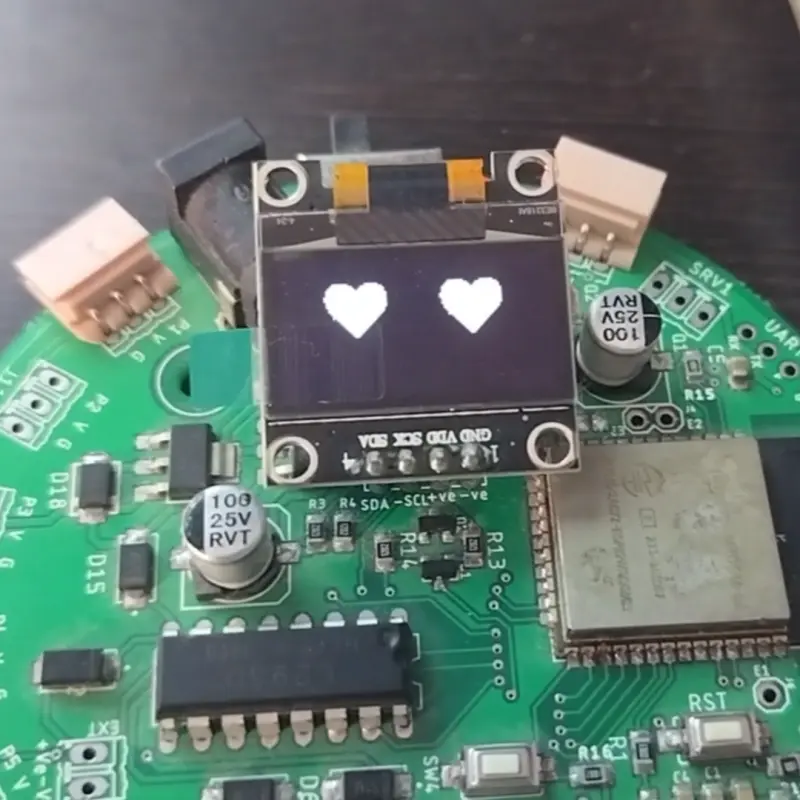
Overview
Ani-Emo-Eye (pronounced as AN-i-moh-eye) is an innovative project designed to integrate emotional intelligence into robotics. By combining edge computing with embedded hardware, the project creates a responsive robot face that reacts to human speech. The system captures audio, transcribes it into text, analyzes the sentiment, and then visually expresses the corresponding emotion through animated eyes on a compact 0.96” OLED screen.
At its core, the project demonstrates how modern machine learning models can be bridged with low-cost microcontrollers to create interactive, emotionally aware systems. It is particularly well-suited for social robotics, educational tools, and advanced prototype development.
Technical Architecture
The project operates through a distributed architecture involving a master system (PC or Edge device) and a slave microcontroller (CAP10 Pratham).
The AI Pipeline
- Speech-to-Text: The system uses the WhisperX model to transcribe user speech into text with high accuracy.
- Sentiment Analysis: A custom-trained LSTM (Long Short-Term Memory) model processes the transcribed text. This model is capable of classifying input into six distinct emotional categories: joy, sadness, anger, fear, love, and surprise.
- Communication: Once the sentiment is determined, the master system makes an API call over Wi-Fi to the microcontroller.
The Embedded System
The CAP10 Pratham, an ESP32-based microcontroller board, acts as the display controller. Upon receiving a mood command via its local API endpoint, it triggers specific animation sequences on the OLED display. The display logic is implemented using the Arduino framework, leveraging the Adafruit GFX and SSD1306 libraries to render smooth, expressive eye movements.
Hardware Components
- CAP10 Pratham: A versatile, made-in-India microcontroller board used for handling Wi-Fi requests and driving the display.
- 0.96” OLED Display: A compact I2C screen that serves as the robot’s “eyes.”
- Edge Computing Device: Any system capable of running the Python-based sentiment analysis and transcription stack.
Software Implementation
The project is divided into two main software environments:
Python Backend
The backend handles the computationally intensive tasks. It includes a preprocessing pipeline that cleans text by removing URLs, punctuations, and stop words before passing it to the LSTM model. The integration is managed via Jupyter Notebooks, specifically Prediction and Integration.ipynb, which orchestrates the recording, transcription, and API communication.
emotion_mood_mapping = {
    "fear": "F",
    "sadness": "S",
    "joy": "H",
    "anger": "A",
    "love": "L",
    "surprise": "N"
}

def send_mood(mood):
    url = 'http://192.168.1.1'
    payload = {'mood': mood}
    response = requests.get(url, params=payload, timeout=2)
Arduino Firmware
The firmware configures the ESP32 as a Wi-Fi Access Point (SSID: CAP10 Eye). It listens for incoming HTTP GET requests and updates the OLED animation state machine based on the mood parameter received.
Getting Started
To deploy Ani-Emo-Eye, users must first set up the Python environment using the provided requirements.txt. The hardware setup involves connecting the OLED display to the CAP10 Pratham via I2C. Once the Arduino code is uploaded, the master system connects to the board’s Wi-Fi network to begin sending sentiment data. For those interested in customization, the project includes a Sentiment Analysis.ipynb notebook and a dataset for retraining the LSTM model on different emotional nuances.